Useless

LD22

Day 1 Conclusion

No screenshots to share at this time; unfortunately, I spend the better half of this evening working out the collisions for player movement before doing anything else.

I have to use ray-tracing to physically simulate the collision, but there is some mathematical error in the way jMonkeyEngine calculates distance from the ray shot, which prevents certain directions from preventing motion correctly… you just get stuck to the wall. I’m not convinced this is a jME problem though. I think I have an idea of how to fix it, but I’m going to bed before I lose my sanity any more.

Tags: jmonkeyengine, ray-tracing, Vectors

I was so very close to giving up

but I have not! I have learned how to use ray casting to calculate the amount to “push” back on an object to ensure they don’t slide straight through it!

Unfortunately, my implementation doesn’t work at very low frame rates. Moving right along.

My plan right now is to use jME’s lighting system to add atmosphere to the game levels. The level will have a very dark ambient light added over the whole scene, and then stuff like torches will cast point lights.

Tags: jmonkeyengine, lighting, ray-casting

I’m actually getting further, faster

When I think about the progress that I’ve made in the game so far, I realize that my LD19 project took about half the entire event just to get the entity management working correctly. I’ve been working on a level editor and game mechanics for the past hour, and this time I have collisions working as I want them.

I bet I’ll be able to get more done, like cool sprites, music and sound effects, then I did last time.

Tags: progress

(Mostly) Complete Level Editor

Well hello there!

I have almost finished my level editor. It currently saves the world data to the models folder using jME’s BinaryExporter (wow, that saves a hell of a lot of time), and you use the mouse to place tiles, and the scroll wheel to cycle between tiles and objects. Right clicking removes the top-most tile (basically, the first one the picking ray hits).

I’m going to try using the lighting system to add some moody effects next, after I create some more graphics. It turns out, making nice tile graphics really isn’t that hard after all.

Tags: jmonkeyengine, level editor, tiles

Adding features, building the castle

So far so good. I’m coding in new types of tiles and I’ve finally managed to get the light code working perfectly in all conditions. After I’m done implementing the various gimmicks, it’s time to start filling out the castle (and probably redo that character sprite, too cute lol).

Maybe I can program a cool distortion shader for the character sprite. Or use fog particles to indicate that he/she is ephemeral, like a ghost. And I’ve got plenty of time to make it all, after downing this Monster!


Tags: jmonkeyengine, light, screenshot

Gimmicks and Music complete, on to level design

Stepping into the final phase of the game’s development! Mechanically, the game is complete, but now the entire dungeon needs to be built using the built-in level editor. I could have the game finished hours before the deadline!

However, it is sleep time now. I’ve been working on the game for 16 consecutive hours, with some pauses here and there. I’d say things are going a lot more smoothly than last time.


Tags: jmonkeyengine, level editor

Total burnout, game submitted

Ugh. I reached a total brick wall (hehe) and couldn’t think of anything to do with the game. I realized that I would have to make a lot more gimmicks in order to keep the dungeon interesting, and I simply don’t have the time to implement all of that. So, I’m releasing it as-is.

I did, however, learn a lot from the competition this time around. jMonkeyEngine is a bit impractical for 2D games with very basic entity behavior, but it can be done, and it is otherwise fairly robust. I feel as though if I had the time, I could very easily create a full, 3D game on the engine. I also learned how to do physical collision using ray-casting, and for the most part, the implementation in the game works perfectly (except for a little exploit that I wonder if many people will find… it was very fun to play with in testing).

If I hadn’t decided to build the game for the purpose of learning jME as opposed to taking an easy route and using Swing or Slick (like Notch is doing), I probably would have made it far more complex and long.

Oh well. It was fun, and I’ll try to compete in the April competition if AP studies don’t get in the way.


Tags: burnout, jmonkeyengine, post-mortem, submission

Java SE 7 Requirement Update

If you were trying to play my game in the past few days and were met with “Could not find main class alonegame.AloneGame”, please upgrade Java to version 7.

Tags: java

Comments

vubuntu
20. Dec 2011 · 09:47 UTC
Why not compile for JRE6.29? Not everyone updating their JRE as frequently as java programmers.

My hosting is down for a bit

They’ve been setting up SSL on the domain for the past few days, and it appears my subdomain broke, so my game can’t be downloaded at the moment. Sorry for the inconvenience, trying to get it working as soon as I can.

LD26

Progress Report #1

LD26 Progress Report 1

Progress is coming along on this strange tower climber. My adaptation of the theme is that of limited controls and drawing using only primitive shapes like squares. Not shown in this still picture is the effect in the background. Colors are tentative.

Like other tower climbers, you are not able to control your direction. You can only jump. The idea is to climb the tower by utilizing gimmicks along the path. I have a primitive level editor already made which I will use to produce levels in the last 4 hours of the event.

Progress Report #2: Test demo!

One button platformer

More gimmicks implemented, faster performance, and a short sample level to play. Not to mention cross-compilation.

Speaking of cross compilation, here have a demo!

LD28

I might be in!

I don’t know yet. I have an exam about halfway through the event that runs for 3 hours, so it’s a strong possibility I won’t be able to do much. We’ll see!

If I do compete, I’ll either be using Unity writing scripts in C# or writing a terminal-esque game (roguelike?) in Java or C++, with Lwjgl or SDL.

Sociopathic Innocent Critter Serial Murder Simulator

That’s what I’m making, and you’re not getting a screenshot yet because I need to add the gore and splatter and bloodlust and tea.

Things I’ve learned about Unity:

  1. Animations using component properties is kinda neat but a little hard to do make any actual use of…
  2. Raycasting has a little bit of state representing how it feels when you call the function.* The result is a whole lot of confusion.
  3. How do I art

* Game Objects are ephemeral, multi-planar beings that can only be described as “ghostly” in the raycasting process

QUICKLY YOU HAVE ONE MINUTE TO KILL AS MANY WOODLAND CREATURES AS YOU CAN

Dropping out of Compo

Too stressed. Bad things. Et cetera.

Maybe I’ll have something for the Jam.

Comments

15. Dec 2013 · 02:51 UTC
Its ok n_n dont worry, relax, have fun, be happy :) have a good night/day
BinaryBot
15. Dec 2013 · 03:02 UTC
^ This comp is meant for fun! 😀

LD29

I’m in — Ludum Dare 29

Jeez, I haven’t been able to do a Ludum Dare game in a whole year. That changes now, though! Because I’m most certainly in this time.

Tools:

  • Unity Engine, or Python and PySDL2, depending on how I’m feeling at the time of the theme announcement.
  • Blender, Photoshop, Aseprite as needed for graphical assets
  • Sunvox, Bfxr, Audacity, for sound needs

Last time, I did an SFML and C++ solution for a one button tower platformer. SFML is messy and icky and I will not use it again. So if I choose not to go down the Unity route with something 3D, I will make it in SDL2 directly, because I love the SDL API and I have been itching to do some serious Python code after I spent a few weeks toying with it.

I have also been spending a lot of time learning Sunvox and Blender, the former in particular, and can now produce some programmer-level assets in all fields of the game’s development. Which means not only programmer art, but programmer sound and music too. Is this a good or a bad thing? I am not sure.

While I’m on it, Unity’s 2D support in 4.3 is bad for a few different reasons, so if you’re planning on doing 2D in Unity, I’m going to advise you to stay away from it unless you have a hand made physics solution (something that just uses box colliders would be ideal) and a reasonably well optimized tile map system. Neither of which are difficult to implement on the spot, but it’s a pain in the butt that Unity’s own support for physics is bad and there’s no editing grid let alone tile mapping at all.


What’s the actual interest in streams?

As far as I can tell, game jams are usually fairly self-contained within their community. It’s not like there are lots of random fans who would watch people stream themselves making games over a weekend, with very few notable exceptions (e.g. Notch). Or, at least to my understanding.

Am I correct in this thinking? I’m trying to decide whether or not it’s worth my time to stream, or to simply make a timelapse.

Comments

23. Apr 2014 · 04:49 UTC
I’ve logged into livestreams concerning coding and art and I’ve learned loads from that. I never usually stay for hours but there are tons of great things you can pick up.
noom
23. Apr 2014 · 05:39 UTC
I agree with the above.
deathray
23. Apr 2014 · 05:54 UTC
The people most likely to watch (us Ludumites) will be busy making games. I’d recommend recording it rather than expecting a big audience while live streaming.
quill18
23. Apr 2014 · 09:11 UTC
Here’s why I stream:

Twitch Streaming Guide

Hey everyone! Here’s a guide on how you can stream your game development process on Windows. Streaming is one of many ways you can participate in the community and share your development experiences.

You will need to install Open Broadcaster Software. This is a competitor to the popular XSplit, and in my opinion is easier to use. Also, it’s free!

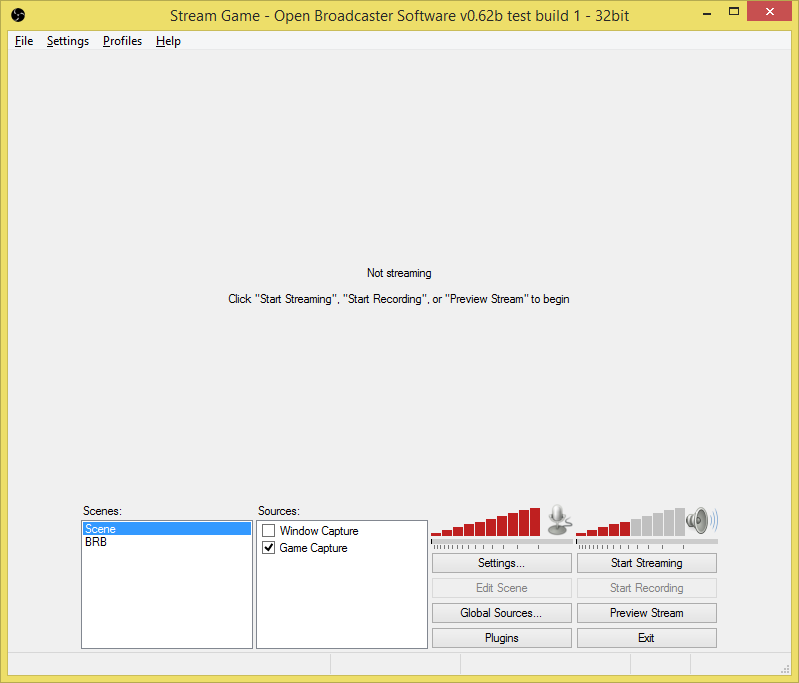
When you start the application, you’ll see a window similar to this one:
OBS tutorial 1

You’ll see two boxes labeled Scenes and Sources, which are very important to composing your stream production:

  • Sources are aptly named video sources which can be layered and positioned to create the final output. For most purposes, simply using a Monitor Capture is fine enough. You can right click here to add and manipulate sources.
  • Scenes are configurations of sources that you can switch to using bound hotkeys or plugins that automatically switch scenes for you. I recommend setting up at least two scenes and binding them to hotkeys, one as your desktop and the other as a “I’ll be right back” or censor screen so you don’t have to show an idle screen or something private. A funny gif will suffice (yes, you can use pictures as sources).

Press Preview Stream and play around with your scene and source settings to get a feel for the application. Once you’re ready we can start working on the encoding and uploading to Twitch.tv… Press Settings, and you’ll get this window:
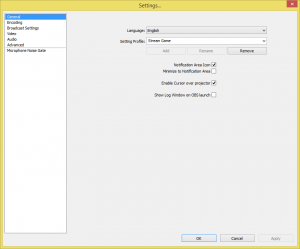
OBS Tutorial 2

On the left side:

  • General — change application language, switch and add streaming profiles, various settings
  • Encoding — change which encoder is used. If you are using Intel’s integrated video on Sandy Bridge and up processors, you should use Quick Sync. I haven’t seen performance stats for Nvidia NVENC for those who use those graphics cards, but I have heard that it is actually very bandwidth heavy. So play around with these settings and observe your Preview bitrate and performance.
  • Broadcast Settings — here you can choose to record directly to file or to a streaming service. We’re using Twitch here, so what you’re going to have to do is login to Twitch, go to your Dashboard, and click Stream Key on the toolbar, and copy your Stream Key from there. Select Twitch as your streaming service and a server near you, and paste your stream key into the box. Set some hotkeys for toggling the stream (I use Ctrl+Alt+Num7 and 8).
  • Video — This controls the output size. You should choose your monitor resolution and then downscale it as you need to based on how much bandwidth you have. Since we’re not hosting full video game streams, it’s safe to set your FPS to 15 to dramatically reduce bandwidth usage and maximize your set bitrate from the Encoding panel.
  • Audio — You probably won’t have to mess with anything here, but it’s worth mentioning. You can set mute toggle hotkeys, push-to-talk, etc.
  • Advanced — Set the encoding profile to main and the keyframe interval to 2, or the Broadcast Settings panel will continue to whine at you.
  • Microphone Noise Gate — this is a panel added by the Microphone Noise Gate plugin, this will automatically toggle your microphone so background noise doesn’t get into the stream when you’re not speaking. You’ll have to configure this based on your microphone setup.

Once you have reviewed all of the settings panels, you can start your stream by clicking “Start Streaming”!

Now that you’re streaming, you can go to your dashboard, hide the preview (so you don’t get a feedback loop from the sound of your stream) and change your playing status to Playing Ludum Dare, as follows:

OBS tutorial 3

By setting your Playing status to Ludum Dare, you’ll show up on the right panel on the Ludum Dare website as well as in the game category for the jam.

Hope this helps!