LD29 April 25–28, 2014

My Top 5

I present my personal Top 5 games of LD 29 in no particular order, their titles redesigned in the style of my entry: DIVE

I have rated 116 games now, liked a lot of them, but these are 5 that really stood out to me.

test2

UPSTREAM by Viza

This one is probably the one that impressed me the most from a gameplay perspective. You rarely see a puzzler this well put together in a LD-competition. The mechanics work flawlessly and, as an outstanding feature, it has an undo-mechanic, which completely eliminates the frustration of restarting a level when you made a mistake. You just rewind a bit, correct your actions, and move on. Viza also hit the difficulty of the levels just right: Hard enough to feel like a proper puzzle, but never frustrating or ridiculous. Really loved this one. Check it out.

godlives

OUR GOD LIVES UNDERGROUND by Andrew Shouldice

While this certainly is lacking in gameplay, it has absolutely stunning graphical design. The downscaled, pixely top-down 3D graphics make it one of the moodiest games of the competition. When walking through the underground tunnels, the shadows and cleverly put assets near the camera give it  a really cool feel. Some added gameplay, a top-down shooter seems pretty obvious, would make this a really promising game. You gotta check it out just for the mood it sets, though.

fisherman

FRIEND OF THE FISHERMAN by rubna

The best pixel-art in the competition. Period.

This game has its beauty in the movement. Everything moves, everything moves somewhat physically correct, while perfectly blending into the highly pixelized look of it. Very carefully and well put together entry, this really deserves praise for its visuals while also having quite fun gameplay.

kalahari

KALAHARI BABYSITTER by TijmenTio

Juicy as hell. When talking about the “feel” of the gameplay, this one takes the cake. It feels fast, it feels responsive, it has wonderful arcade gameplay. Part of that are the amazingly animated graphics. This guy knows exactly what he’s doing. Definitely give this a shot, it is really fun.

gathering

THE GATHERING by oatsbarley

A city-builder. As a LD-entry. Haven’t seen that before.

I had some troubles with this one at first, as i did not quite understand the Hunger-mechanic, but once you figure it out, this works really well.  With a cool day-night cicle dominating the gameplay-mechanics, your village grows bigger every day, smaller every night, and finally strong enough to defend against the monsters coming out of the forest.  This combined with the really beautiful low-poly graphics (that day-night cycle looks amazing) makes this one of the entries i have spent the most time on.

_____________________________

Looking forward to the results, now that there are only hours, not days, left on the clock. Found a lot of enjoyable games this LD, and my scepticism towards the theme seems unreasonable now, as i really liked some games it inspired. Good job everyone.

Infection Let’s Play and Interview! :D

Hi there!

Daniel Snd (The arts side of Infection Team) has recently been featured in one of WeiseGamer’s Interview with a Dev, talking about Infection 😀


The game was also recently featured in a Let’s Play by oNightPineberries


And the awesome Ludum Dare to Believe Series, from the Button Masher Bros! (At 7:50)


We’re very happy with all the videos we’ve been seeing of people playing Infection ^^  It also helps a lot to see where we can improve 😀

Jumpland Underground – Dev Notes/Postmortem/Or Something

LD_Screenshot_03I felt like writing a bit about some of my thought process while making my game, and some reflections, I’ll also talk about some of the changes I’ve been making and planning as I’ve continued development, since it’s taken me so long to get around to writing this. This might just turn into me rambling on for a while about my game, but maybe someone will find at least part of this interesting or informative. For reference, I’ve also posted the art and sound effects from the jam version here. Anyway, if you haven’t played it yet you might want to check out my entry here before reading more (and thanks to anyone who has played and rated it).


Concept

The first idea I liked when thinking of the theme “beneath the surface” was some sort of traditional platformer where the level and action is being controlled by someone underneath the level. The general concept I eventually turned this into is that Jumpland is a theme park based on classic platformers where the main attraction is to travel through a platformer. The inspiration from classic platformers is why I went with “grassy” visuals similar to what you would expect out of an early Mario level, or Green Hill Zone in Sonic. Though one of my plans for future development is to have more “lands” with different visuals and obstacles, such as a “snowland” and “desertland.”

welcomeThe above ground character (referred to as the “Guest” from now on) is a guest at this amusement park, while the underground character (referred to as the player character from now on) is using the underground maintenance tunnels to run the park. Thus you only directly control the movement of the player character to see where the Guest is going and use underground buttons to move pieces of the above ground level to help them get farther. In addition, the jumping of the Guest is actually the result of the player character triggering the jump boots the Guest is wearing. (Though in game there is no real indication that this is how jumping actually works).

I felt I wouldn’t have the time to do a good job building static levels, which is why I went with a randomly generated endless “runner” style game. When working on the post jam version I’m going to continue to focus on the endless mode, but at some point in the future I would like to at least consider also working on a set of static levels for this, possibly focusing on more finely tuned challenges or puzzles requiring more precise timing or thinking to get through.

Characters

guest_walkFor the Guest I went with an obvious grin and big eyes to reflect the idea of a kid enjoying a big amusement park. I went with a red cap due to the Mario inspiration and to avoid having to worry about drawing hair. Since the idea was for jumping to be triggered by the player character from underground, I needed some sort of “jump boots” instead of regular shoes. Thus the design was actually loosely inspired by the “Thwomp Stompers” from the Super Mario Bros. live action movie. The walking animation for the Guest is an exaggerated march to reflect how he will continue to blindly walk forward, oblivious to whatever danger he might walk into. Other details like the shirt color didn’t get much thought aside from getting something that I thought looked good.

player_walk.gifFor the player character I used a faster animation because I wanted an effect similar to a short cartoon character scurrying about. The lack of eyes is mainly a result of how I started with just a head and hat and liked the look of it without eyes, especially after I added the big nose. I guess the general concept of the character design initially came from the idea of an old construction foreman. This was why I started with just a yellow hard hat, which then led to the idea of adding a miner light. That was probably what also inspired me to add the notepad. There isn’t much reason for the green skin aside from how I felt more natural skin would blend in with the hat, and I thought that shade of green looked pretty good.

As seen in the above gifs, I’ve started working on improvements to both sprites. I added some shading to the edges of both their heads and bodies to help the sprites stand out. I’ve made the guest a bit slimmer which should help make the march animation clearer, and better differentiate them from the player character. In the case of the player character I’ve changed the shirt color to make it more visible in the dark tunnel. I’m also considering ways to allow customization, such as changing character colors or alternate hats, though this will likely require some significant changes to how the sprites are made and displayed in game. My current idea for this would be to have each character made up of multiple sprites (separate sprites for arms, legs, head, body, and hat). This would likely simplify the process of character customization, but I’m going to continue considering other options since there could be a hit on performance by using multiple sprite renderers for each character.

One of the things I’m really happy about is the mining light of the player character. When initially designing the character I quickly fell in love with the idea of having a spotlight attached to the character to handle the lighting in the tunnel. However, at first the character and light felt very disconnected due to it being a flat sprite using an attached spotlight to light a 3d tunnel. This was partially fixed by moving the light source further into the sprite, rather than actually coming from the headlamp on the sprite. This still didn’t look right due to the headlamp being dark like the rest of the sprite, so it didn’t look like the headlamp was actually on. This was then finally fixed by adding a point light positioned on the headlamp, and setting it to only illuminate the player character.

light_1

Original Configuration

light_2

Moved Spotlight

light_3

Added Point Light


Spikes

Originally when I came up with this idea I didn’t plan for there to be so many spikes. But, since I needed a way to kill the Guest, spikes were the most obvious first choice, and were quick to make. Then as I worked I never got around to making other ways for the Guest to die (such as being crushed, or other hazards). In addition, given the nature of the game I didn’t want to allow the player to leave the Guest walking into a wall while slowly looking and planning for what’s ahead. Thus I ended up with some obstacles with extra spikes thrown on the front to kill the Guest. Luckily there are a number of things I could do/have done in the post jam version to avoid the repeated use of spikes:

  • Slopes.
  • Crush deaths (Removes need for spikes on bottom of moving blocks)
  • In ground pits (so that traps like the ones using a bridge would only need the bridge to rise to ground level,  while the spikes, or some other hazard, are below ground)
  • Allow the Guest to get “stuck” walking into a wall, but set up a fail condition if they spend too long not moving forward.

Here are some screenshots showing some differences in the post jam version after implementing slopes and crush deaths.

Jam Version

Jam Version

Post-Jam Version

Post-Jam Version

One of the issues I found while continuing to play after the jam was how the spike collision detection seemed unfair sometimes when jumping onto blocks. This is because I originally set the collision as a trapezoid to more accurately reflect the visuals of the sprite, Unfortunately this meant that sometimes when it looked like the Guest should of just landed on the edge of the top of a block, they would still barely hit the corner of the spike collider and die while standing on top of the box. As a result, I’ve now switched to using just a normal box collider on spikes, which fixes the jumping on blocks issue while not having any noticeable impact on other spike interactions.

Collision shown by green outline. Left=old, right=new

Collision shown by green outline. Left=old, right=new

Buttons

In the jam version all the underground buttons behave the same, hold the button to raise a portion of the obstacle, which lowers back down while the button isn’t held. I originally wanted more variety in how the buttons affected the above ground, but I didn’t have time to rig up different types of button behavior, such as toggles and other ways to manipulate obstacles. In order to maintain consistency for the player in the post jam version new obstacles using this button will likely keep the same “hold” mechanic, though possibly with more variety in direction of movement (such as a platform which moves right while the button is held and goes back left when let go). I may also still implement toggle type obstacles, but they would likely have a different model used for interaction (such as a switch or lever).

buttonIn order to make it clear when the player could hit a button I added a spotlight above the button which is only turned on when the player is in position to press the button. I used the color of the light to signify if the button was being held. I felt this visual feedback was really important given the darkness of the tunnel and the possibility of a user not getting audio feedback if they are playing without sound (which would be very likely in the case of a mobile user). An extra bonus of the spotlight is that it allows the user to get a clearer view of the player character which usually only has the slight lighting of the headlamp on part of the head and hat. In the post jam version I’ve also made the button itself a little larger to help with visibility.

Sound Effects

The sound effects were all generated using Bfxr. I’ve included the sound effect WAV files in the assets zip (available here if you missed the link at the start of this post, or don’t want to scroll all the way back up), however you may notice they don’t sound the same as in game. This effect was done by adding an audio reverb zone to the camera and using the StoneCorridor preset to make it sound more like you are hearing the sounds while in the underground tunnel. I didn’t spend too much time generating sounds, so I will likely go back at some point and modify the current sounds, or create new ones, so that they sound better when heard repeatedly.

Music

The music was generated with abundant music. My process was mostly just using random seeds to generate MIDI files, which I exported to WAV using LMMS. Once I got something that I liked the sound of and fit well enough with the game the only other editing I did to the file was using Audacity to cut out some of the ending silence to make the loop less noticeable.

You can download the music track from soundcloud below.

Under The Hood

I’ve also been working on some internal structure changes to help make future changes and additions easier. The most significant of these is how I create and manage obstacles. Originally I created each obstacle as a prefab, and the script generating obstacle placement had a list of these prefabs. The main problem with this though is that Unity does not currently support nested prefabs (unless you use a third party plug-in, or build some system yourself). This meant that if I wanted to make a change to a common object (like the spike collision mentioned earlier) I would then have to waste time copying that change into each spike of each obstacle prefab, instead of simply changing the base spike prefab and having that change automatically propagate into the obstacle prefabs. So for now I’ve removed the large obstacle prefabs and now have an empty “Traps” gameObject in my scene, whose children are the gameObjects for each obstacle. With this I’m able to have individual objects like the blocks and spikes maintain links to their prefabs. Another benefit of this change is that the script generating obstacle placement only needs to be given the one “Traps” gameObject, and can then read its children at start-up to generate a list of obstacles to work with.

Newly split segment prefabs

Newly split segment prefabs

In a similar manner, I’ve also split the “segment” prefab I was using to build the tunnel and ground. Now the underground portions are in one prefab, while the dirt and grass of the surface are in a separate prefab. This means now new prefabs used for different environments on the surface (such as the snow and desert I mentioned earlier) only need to contain the unique surface portion, while the underground tunnel is still only contained in one prefab.

The Future

In addition to some of the changes shown above I’ve added an options menu to allow for adjusting music and sound volume, as well as some options for input layout. I originally planed to have the initial release of the post jam Jumpland Underground for Android before the end of voting, but I think I’ll delay it some since I want to add a tutorial and maybe a few other small things before releasing on the Google Play store. Anyway thanks for reading all this, I’ll probably make another post once I’m ready for the initial release of the post jam version. But for now I’ll go play and rate some more games since there’s less than a day left to rate.

Post mortem

Not so much a post mortem about the game, but about my goals: Same as last time (LD#27) i wanted to use this oportunity to learn, to get to know PHPStorm and to make my first Phaser.js game using TypeScript.

Well, i have to admit, i am very happy with the outcome. Not that my game Beneath the surface with Sir Walter Wuffington is so great and enjoyable that i am utterly sattisfied with it as a game per se, but i achieved my goal of finishing my first Phaser.js game and i got know PHPStorm a bit. On the TypeScript side i have to admit that i had a hard time to adapt the way i code JS to the TS style and paradigms, but these things can’t be achieved over night so to speak.

THE GOOD

Which JS Gameengine to use? After wrestling with my bare hands (i.e. without any game engine) last time around, i decided that it is time to try one of those nice geme engieenes everybody was talking about. After doing some research Phaser.js caught my eye for being relatively new (i.e. supposedly not filled with obsolete clutter and paradigms), which seemed to have a relatively active community and responsive developers (rich hangs around a lot over at the html5gamedev forums) and mobile performance is one of their main focal points. Now, after implementing my first game with it, i am a convert. Try it out for yourself, there are tons of examples and tutorials, and on top of all that it has TypeScript bindings too :)

Is TypeScript really that much better than CoffeScript or just plain JS? No idea! Looks good though. I have to admit that even with all my motivation, i simply lacked the time to really make use of TS’s advantages. I managed to write my game in TS (well, TS compliant) but it is basically plain JS with a coating of TS to make it compile. After all the time i spent setting up the whole TS / PHPStorm / Phaser.js shebang, there was not that much time left to worry about elegant coding, sth. that i normally value very highly (although i am more an average programmer solutions that are generally more interesting and than elegant).

I found my new personal favourite IDE: for everyone out there pondering the question of which IDE to use for all their JS / PHP / HTML5 coding, i can give you a warm recommendation: PHPStorm (or WebStorm if you don’t need the PHP part, PHPStorm is WebStorm + PHP) After using Texteditors, KDevelop, Eclipse, Aptana for over a decade for all my WebDevelopment, i have found my new IDE of choice. The code completion, existing templates (jQuery, Drupal, WordPress, …) JS Debugging, the ease with which it integrates with other libraries absolutely convinced me, after being disapointed with the slow improvements and overal buggyness of Aptana.

THE IMPROVABLE

Expectations: As i mentioned before, due to the time constraint and my high expectations i had to the game itself, it is not as good as it could have been, but that was to be expected. As i spent probably two thirds of my time figuring out how to do stuff in Phaser.js, TS and PHPStorm, there was not that much time i could invest into the actual game making. I am still pretty content with the result, this time i even have some sounds (two to be exact, but it is a start). If i continue at this pace and stay with the current toolchain, i might produce sth. halfway decent around LD#31 :)

I was still expecting too much from my game i guess, as i wanted to learn all that stuff but at the same time couldn’t bring myself to tone down my ideas for the game, as it would have felt even emptier / more boring than without the second view. It might be worth to scrap that second part and add some juicyness instead, but who knows, next time around i’ll probably have enough time for both as i will be more proficient in using my current toolchain.

THE BEATUIFUL

As always it was amazing to see how much can be achieved in such a short time. For myself i am happy about the work / learning i did in just 48h, and it is always stunning to see what other ppl can come up with in just 48h / 72h.

The fact that there are others like me out there that just love making games, creating stuff, seeing their ideas come to life and being (more or less 😉 ) enjoyed by others warms my heart.

I can’t wait till next time, till then
goeth forth and codeth

p.s: But please, don’t let my ramblings keep you from trying my game :) :


Beneath the surface with Sir Walter Wuffington

Main Screen

Side View

Tags: phaser.js, post-mortem, postmortem, typescript

“Oh My Oilrig!” just went live in Google Play!

As I received a lot of good feedback on my LD29 entry, “Oh My Oilrig!”, I decided to continue working on it. After rewriting the whole code base, I added more features and designed stuff for upcoming updates. Now, the first release version is up in Google Play! If you have an Android device, go grab it and tell me what you like ^_^ –> https://play.google.com/store/apps/details?id=com.manabreak.oilrig

icon_hd

Thank you so much for everyone who played my entry and gave me awesome feedback, wouldn’t have done it without you guys and gals. :)

Tags: android, oh-my-oilrig, post-compo

Post-Mortem: Paddle Battle Pegasus

Concept: Deal or No Deal crossed with an infinite runner wrapped around a sea monster… BENEATH THE SURFACE.  (Try web or download here.)

splash-screen-art

What worked

The Whirlpool
We put a lot of time and effort into the whirlpool.  As the central mechanic and visual element on the screen, we wanted to get it right.  We’ve had great feedback that the controls felt pretty solid, and the physics were well received.  seamonster-below-the-surfaceWhat was interesting is that the original whirlpool had a clean, clear cut, unpixelated design.  What we found though, is that all that detail in motion made it incredibly hard to focus on the other details like where the player, coins, and enemies were located.  Instead we pixelated it, and stacked a partially transparent copy out of phase (at a slightly lower frame rate).  This allows us to get a background animation that doesn’t repeat for much longer without the hit to download size.

Deal or no Deal
We added a mechanic to let the player sacrifice a part of their score to escape death and get a chance to earn it back and then some.  The catch is that your score is held in chests of varying value and the one sacrificed is chosen at random.  I think it was well received among LD players because it was something a little different than the norm.

What didn’t work

Deal or no Deal
Outside of LD, we had a lot of feedback that the mechanic was sort of confusing.  In the middle of all the action, players were not intercepting the visual cues we had though would help explain what was happening to their coins.  A tutorial that would freeze the game and explain each part of the scoring as it becomes significant would probably have mitigated that.

Dying Immediately
Due to the way the vortex physics were calculated, every time the game restarted, the ship would be rotated directly towards the monster and die if the player didn’t know to hold an arrow key before hand.  We didn’t notice during development because the adjustment became second nature.  :-/ This was probably the source of most of the negative feedback received.  I finally hacked in a solution tonight as a post-compo bugfix.

Game Over Dialog
This screen was re-purposed from an earlier iteration, and really should have been redesigned from scratch.game-over-sacrificeThe red X was supposed to let you know you’d be sacrificing a chest, but instead indicated to players that they were not allowed to click it.

The white text above posing the question about sacrificing was never noticed because it was so bland compared to the rest of the screen.  We found several players chose to lock in their score when it didn’t make sense, or would restart when it was safe to continue.  We should have had other eyes on the screen earlier in the process.  There was no time to fix it at the end.

Mac Support
There were also a few random display bugs that I couldn’t track down since they seemed to only happen on Macs.

Workflow

Collaboration FTW
I’ve participated in LD before, but this was my first time working with an artist.  It was fantastic to be able to really focus on my strengths of design and programming and leave the art and sound to someone else.  I highly recommend it.  We used Google Drive to easily share assets.  It may have been overkill, but I also set up a Git repository for locking in each iteration of our design.

simple-mind-map-pbp-boltzinteractive

High-level mind map of rough gameplay elements

Getting Organized
The biggest hang up for me in getting a game from idea to reality was finding a way to capture and organize my thoughts.  I wanted something I could rapidly dump ideas into, but structured in a way that I could make sense of it still in a semi-sleep deprived state 47 hrs later. I finally stumbled upon XMind, a free “mind mapping “tool and it made all the difference.

It allows you to very rapidly transcribe brainstorming sessions and logically group your ideas.  Then you can collapse, expand, and zoom around your idea making it far more manageable.  When you get that next amazing idea, but aren’t at a great breaking point to go hash it out, you can quickly capture a few bullet points near related features.

Focus Like a Laser Beam
What this low-overhead organization really buys you is the ability to let 95% of the idea fall out of focus so you can really concentrate on the task at hand.  Our primary goal was to get something, anything playable.  Then we would iterate over that design and enhance game play based on what we learned work and didn’t.  Iterative design also gave our play testers  a chance to say “I wish this could…”.  We plugged this feedback right in to our mind map for a future iteration.  For example adding the monster, then later tentacles, then still later allowing them to move and adding the visual blending effects.

mind-map-milestones-pbp-boltzinteractive

Collapsed Milestones (iterations) tree.

mind-map-expanded-milestones-pbp-boltzinteractive

Fully expanded milestones tree.

Triage
Late in the compo when you’ve built up dozens of polish items and bugs, it can be easy to allow the scope creep to overwhelm you and torpedo your project.
At this stage it’s important to be able to triage your most significant faults and features and let the others lay to rest (until the post-compo version of course.) 😉

A lot of great ideas were left out, but I am really pleased with what we were able to pack in within the competition.  Several of the features we had to nix were the same ones many raters mentioned in the comments, which made us pleased to see we were on the right track.

Am I satisfied?

Absolutely.  I’m really pretty proud of what we’ve made.  It’s my highest quality work to date, and there is a lot of opportunity to wade in to the hosted and mobile markets with a few improvements.

Thank you all for being a part of this community, playing and rating my games, and inspiring the rest of us to greater levels with the works of your imagination.


Deep Dome postmortem

Early in the jam I had a bunch of different ideas. This is pretty normal. I liked the theme, so much so that it almost gave me too many options for achievable small games I would have enjoyed making. In the end I went for my ‘fallback idea’ – something I’d wanted to try if I could tweak it to fit the theme: a Descent-like game with visuals similar to Zombie Gunship.

What I wanted to achieve was:
1) Set up 6DOF ship controls that felt good. Not necessarily identical to the original Descent, but along those lines.
2) Recreate visuals similar to Zombie Gunship (essentially inverted greyscale, with object highlighting)
3) Incorporate this into a small prototype game, as a sandbox for something bigger.

original

All image effects applied

I’m happy since I feel like I largely met goals (1) and (2), with some detours, while the gameplay component of (3) isn’t nearly refined enough.

For (1), I created a ship controller based on applying appropriate impulse forces each frame to a Unity rigidbody. Compared with a kinematic (non-Newtonian) object where you just move the position of the transform directly, using forces had the advantage of having proper rebound physics for collisions with terrain, obstacles and enemies. The key parameter to tweak here was “Drag” and “Angular Drag” on the rigidbodies, so that when you stop pressing a direction the ship glides to a halt as if it’s in a viscous liquid or dense atmosphere. I think I managed to get the feel of the controls working reasonably here, but they aren’t yet perfect. Also, as noted by a one commenter, colliding and rebounding with the rings can be annoying. Ignoring these collision will be something to experiment with in play testing to see if it reduces unnecessary frustration without spoiling the challenge.

For (2), I started with standard Unity Pro Image Effects. I quickly discovered there was no “invert colours” effect in the standard set. While this should be one of the simplest effects to make, I’m no shader jockey, so rather than going down the rabbit hole of creating this shader, I decided I’ve have to just go for visuals that were similar but not the same using what I had on hand. After a whole lot of playing around, I found a combination of Screen Space Ambient Obscurance (similar to SSA Occulsion) interacting with grey fog, plus Contrast Enhance and some noise gave an interesting grainy greyscale effect. This appears to be exploiting some artefacts many games would try to avoid – for instance, the Ambient Obscurance modifies the fog so that distant objects can all be seen, but still become coloured by the fog. By adding a local point light to the ship, and some nice splashes of colour to the terrain, the result was a grey noisy world with local “rainbows” on the terrain. I also added some Sun Shafts to enhance the ‘dusty’ feel of the environment.

Deep Dome - no fog

Example of SSAO+fog interaction: Fog turned off

Deep Dome, no SSAO

Example of SSAO+fog interaction: SSAO turned off

During initial play testing trying to shoot stuff and navigate rings, it became apparent that the objects of interest were not visible enough in the grey grainy world. I needed a way to highlight them. I made a second camera higher in the stack and added the rings and enemies to a Unity layer that only that camera could see. The ‘Right Way(tm)’ to do this is probably using a “replacement shader” on the camera, but instead I made a cyan-tinted transparent RenderTexture showing the output of the second camera rendered to a billboard and positioned it in front of the main camera. Even though this second camera was set to Depth Only, the alpha transparency channel didn’t work as I expected, so the main camera beneath it couldn’t initially be seen. I fixed this by calling GL.Clear(true, true, Color.clear) in OnPreRender() – not really sure why setting the initial buffer to transparent pixels was required, but it worked. This camera setup has the cool side effect of enemies and rings being visible through the terrain (which is invisible to this second camera). Since the texture and it’s billboard are square, it doesn’t cover the whole screen – this isn’t actually what I wanted, but it has the interesting effect of keeping enemies and rings greyscale when they are in peripheral vision. It looks better with a vignette filter applied to it, but I didn’t remember to add that until after the compo.

Deep Dome - no overlay camera

Here’s what it looks like without the second overlay camera highlighting rings and enemies … compared to the original above that Mech enemy just right of the nearest ring is almost impossible to spot

Goal (3) is really gameplay, and I’ll be first to admit it’s a little uninspired and a bit “meh”. My initial goal was really to just a “shoot stuff” game, but having done various styles of space shooter before, I knew there was a lot of work required both on the AI, wave design and scoring side of this to make it interesting. After spending time on (1) and (2), and making terrain, textures and enemy models, I felt like I didn’t have time to make the original gameplay goal fun or engaging. Ideas of a 3 stage, race, then shoot, then race+shoot structure were quickly discarded as too large in scope. I instead decided that a quick 3 lap time trial where people could compare scores would be a better ‘minimum viable product’ for a 48 hour game. I left the enemies in as an extra challenge and for some flavour, tuning the behaviour a little to try and suit the new gameplay, however as others have noted, it seems a little confused as to whether it wants to be a racing game or a shooting game. Actually, I think there are examples where both can work in some form (Wipeout, Death Race, the run for the exit in Descent, or even Mario Kart) but the enemy AI isn’t good enough in “Deep Dome” to make it work.

Instead of going down the rabbit hole of improving the enemy AI, I chose to stay up late putting together a simple background track in Caustic. I hadn’t used this software much, especially version 2, but it’s fairly intuitive if you’ve used and tracker & soft synth before so I was able to come up with a very simple techno track with a bit of an EBM / cyberpunk feel. Not amazing music, but I think it works to set the tone. As a result for spending time on music, the enemy AI remained quite brain dead (face and follow), but it was enough to cause the player a nuisance (sometimes too much of a nuisance) while navigating the track. I also spent far too much time trying to make random procedural terrain with Terrain Composer – powerful software with a horrible UI that I can never remember how to use properly.

This is the first time I’ve ever made and animated skinned mesh character. Common sense says I shouldn’t have even tried this during a 48 hour game jam if I’d never successfully done it before, but after many years of tutorials and attempting to use Blender, something just clicked. I suppose this is a result of perseverance, along with improvements to the Blender UI and documentation. The “Mech” walking animation is really bad, and uses the old legacy Unity animation system rather that Mechanim, but it’s still a significant personal milestone.

I need to put more time into learning how the nuts’n’bolts of how Unity image effects, and shaders in general, work. It’s a testament to Unity’s success in “democratising game development” that someone like myself who is not a hardcore graphics programmer can throw something like this together in 48 hours – however you can always do more by learning more, and I need to learn more. Maybe some naivety is an advantage, since you try crazy things, but I can’t imagine what I would have been able to come up with if I’d understood more of the details.

I’ve done a bunch of game jams now, some have worked out okay and some didn’t. I think next game jam I need to have a timer every 3 or 6 hours, where I must stop and prioritise what is important for the “minimum viable product” game. Throw out what’s not essential for gameplay and work on the most critical task or feature first. I generally try to do this anyway, but a more structured method would prevent me losing track of time while engrossed in implementing features that aren’t actually very important (e.g. terrain details). For this game, I did maintain a list of features and assets, but failed to effectively triage them. Also, the ‘improve gameplay’ task wasn’t given enough priority, partially since it’s a difficult thing to break down into micro-tasks – I’ll have to investigate techniques for doing this and work on it.

General responses to comments on the entry:

First – thanks for checking out my game and commenting ! On the whole we agree about the gameplay deficiencies – shooting or racing but not both would probably have worked best.

Yes, the system requirements are a little high, and it’s probably not very efficient. I recently upgraded my graphics card after many years with a Geforce7, so I didn’t notice how poorly it ran on “lower spec” machines until some more testing after submissions closed. It will run at acceptable frame rates on OUYA at 640×360 though !

Sorry if the controls seemed a bit much (I’m looking at you orangepascal :) ). I tried to keep the controls as FPS-like as possible, since this is what many people are used to. Of course, if you don’t play those types of games, the controls could be a little unfamiliar and overwhelming. The barrel roll was just for fun and could be ignored. I also left out strafe up/down for simplicity, but in a bigger game the option would be there to use it.

Maybe this will be the foundation of a bigger better game in the future, but for now I’ve got several other projects that have to be pushed out the door first.

Tags: postmortem, unity

I beat SnakeFormer! :D

SnakeFormer is the best puzzler I played during LD29. Part puzzle platformer, part Snake – beware, it gets dang hard almost immediately (level 2). You will be incinerated by lava no less than a few dozen times but energetic music is there to console you while you stumble through it.

WILL YOU ACCEPT ITS CHALLENGE?

i won

BONUS: I did not get the title pun until long after completing the game.


Tags: gloating

Comments

19. May 2014 · 13:09 UTC
Woah, thanks a lot for the feature! I’m glad you enjoyed it so much! 😀

Water Miner – stolen!

water miner stolen

This is my compo right here and here is the story of how I discovered it got nabbed.

HOW TO BE ANAL-ITICS

For The Hunger, I had no idea how many people played it and where they were stuck. So I added in some analytics using Countly, which I like because it’s real time.

Numbers are super high at … 20 new players a day, well super high for me I guess since I didn’t promote this thing so I was a bit surprised the other day when I saw this.

going analytics with countly

Exponention growth, but from where?

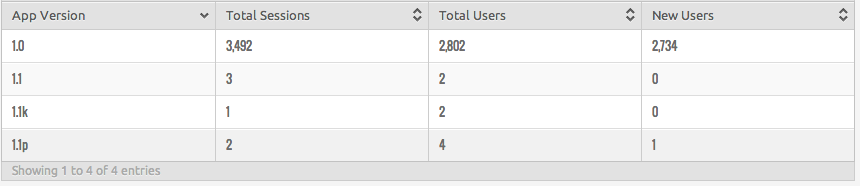
I did post it on Kongregate and Playdot, could K be that popular? Problem with Countly is it’s not made for web, it’s for mobile, so they don’t capture the source url. So I spent a few minutes implementing Google Analytics to a new build, that didn’t work so I did something very low tek: verion prefix with the domain, 1.1p for playfot and 1.1k for kongregate and in case they hotlinked it to my server I kept 1.1 for http://mcdroidgame.com. Then I waited to see which number was increasing the most. And got a surprise.

version analytic

Sourcing from the stone age

Someone nabbed the .unity3d package and placed it on his own server.  

THE GRAND LARCENY

Making something for free is fun because if it sucks, who cares. But how is it if someone steals your free thing and makes some money off it? It does suck a little but what I am really interested is finding what site gets THIS MUCH TRAFFIC, because 1500 play a day is waaaaaaaaaaaay better than Kongregate.

So I google Water Miner Unity and find this…

Water Mining Unity

This is not the Water Miner you are looking for.


The file was probably renamed and google leads nowhere.

What do you guys think, any idea which site it’s on?

My top list(s)

Okay, I played a lot shortly after the compo, but after the first few days, as usually happens, I was swamped by various other activities.

Regardless, here’s my top five:

Compo
1. Epsilon Adventure

Quite an interesting exploration game full of puzzles.
2. Broken Heart

A beautifully stylised entry, quite emotional and moody atmosphere.
3. Like a Bird in the Sea

Very enjoyable questing system, along with a depleting oxygen level when you were beneath the surface. Nice level design.
4. Beneath the Memories

Amusingly narrated and brilliantly executed short storyline
5. Iceberg

Fast-paced puzzler, simple design and ugly as hell but fun to play.

Jam
1. The Stairs

Classic RPG-style game, a lot of content for an LD game.
2. Defy Hades

Platformer in which you obtain various powers which you use to your advantage (or not) to complete levels. Looks & sounds beautiful.
3. SUBLEVEL ZERO

3D space shooter, quite an impressive entry.
4. Charly’s Psyche

Surreal… I don’t know what to call it. Weird and wonderful, nonetheless.

5. Obolos

Beautiful and relaxing.


Also check out my game, Descent 😉

Comments

19. May 2014 · 18:05 UTC
Wow, it means a lot that I made your list, thanks so much! Glad you enjoyed it :)

Decided to go post-compo

I’m taking all suggestions for my post compo edition of my game. Nothing new has been done as of yet, but I’d definitely like to make a full game out of my LD entry.

HAVOCgif_140x223_f15a52

Check it out here

Let me know what you think I should add and also suggestions for the name of the game possibly

He who controls the spice, controls Ludum Dare post jam release

Screen Shot 2014-05-16 at 1.47.53 PM (2)

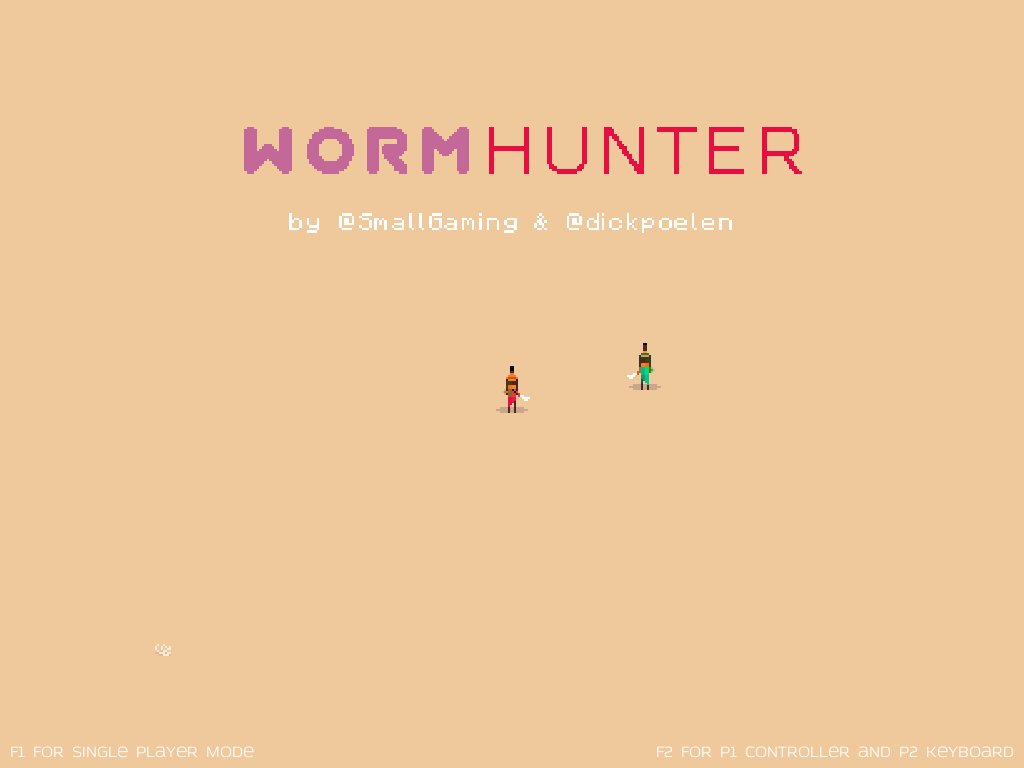
This was a great Ludum Dare for us, specially for Dick because it was his first one. We gotten so many positive comments, we started to work on a better version of Wormhunter for all who left such comment.

Keyboard Controls:
Move: arrow keys / WASD
Attack: E
Dodge: Q
Throw beacon: 1, 2 or 3

Controller Controls:
Move: Left thumbstick
Dodge: Left bumper/trigger
Attack: Right bumper/trigger
Throw beacon: Action buttons, except the top one.

You need to stand still to throw a beacon.
For co-op you will need a controller and single player can also be played with a controller.
In co-op when a player is eaten by a worm, the other player can save the eaten one. Just kill the worm.

We really like to have your feedback. If you want to give feedback, you can leave it as a comment on this page or via Twitter: @dickpoelen or @smallgaming

Where are the links to the builds.

Windows build
Mac build
Linux build

Enjoy and lets us know what you dislike or like about this build!

LD29_delve_7

As LD29 comes to a close I just wanted to say a big “Thank You” to everyone for making this jam so amazing. You’re all diamonds in my book!

Making of main Character of BlackWald Forest

Hello my name is Tom (tom3d.de) and I have here created the characters for our game.

The Main Character should be a little creepy imp and i searched the internet and in the surrounding area for suitable references.

As inspiration i found Quasimodo from the movie Hotel Transilvania.


Mkt010_Quasi1


For the shape of the character I use Sculptris from Pixologic. The advantage of Sculptris is that you not need to worry about the mesh, as it completely dynamically divides the mesh depending on subtleties. So you just let your creativity run free and do not care about the technical stuff.

sculptris1


After sculpting you can paint a basic texture on the mesh directly in Scultris.

sculptris2


so far so good.

The mesh is of course in a very high resolution and must be first in a playable low poly shape.

This I did by hand with the beautiful Retopolize tools in Modo 801

modo1


then i have shaded the high poly mesh and baked all on the the low poly mesh texture.

creepy texture

texture


and the final result at the end was the nasty little imp that running through our game and defended his Princess.

final


so now you can also try out our game the same :)

play our BlackWald Forest


Post-Compo Version is Playable!

Our post-compo version of Kitsuni is now playable!  It should have fixed a lot of the issues with the original, although it is still very much a work in progress.
If people like it or are interested in seeing more, then we may continue to develop it into something much bigger.

Play it on our page HERE

Kitsuni Post Compo

D’oh! I my video compilation of top 10’s won’t be finished before the end of judging! :/

So as some of you may know I put out a open call like a weak ago to get turned on any awesome LD29 games I might not have played. My goal was to play as many as possible (and attempt to beat them all) and then come up with a top 10 in each category. Well, I’ve played 350 games (third highest reviewer of this LD), played every game that was requested by somebody in that post (Which was a lot, thanks for the interest), and I’ve beaten most of the games (There is one LD game I know for sure I’m the only person who has beaten…), and now I’m compiling my video of my picks for top tens in each category and it looks like it should be done… in more than a couple hours.

D’oh :/

I’m still going to finish it and share it with you guys, I just really really wanted to have it done before the end of judging seeing as interest in such a video is liable to drop off very very fast after judging is over. So for those who are among the 350 I’ve reviewed (or anybody else who is interested) please keep an eye out for it, the results of judging will not influence my top 10s which I’ve already decided. Thanks for being such an awesome community, guys, and I hope you like the video when it is finally done. :)

Truth – Post Jam Version

Finally managed to get a post jam version of my game out there.  I think this better captures the look and feel that I was going for.  You can play it here:

http://jasonlay.itch.io/truth

I also appreciate everyone who has taken the time to play my jam entry.  Your comments are valuable and will help make me a better game designer.

If you still haven’t played and rated the jam version, there is still time, play now before it’s too late and you never find out the truth!

Truth


The last stretch

I’m probably not going to find out the results of the Ludum Dare until tomorrow. I spent the long weekend (Victoria Day in Canada) hiking in the woods, and I’m going to crash soon.

I want to say before it’s all said and done that everyone did a fantastic job! I played and rated 350 games, and there were so many outstanding games that I lost count. I hope one of those wins this thing!

As for my game (Kill or Kill ), as I’ve said before I’m making it into a full proper release. The end result probably won’t resemble the Dare game too much, I’m taking the core ideas behind them and putting them into a more solid package. I’m proud of what I made, but it definitely couldn’t work as a complete game that I could sell. I hope to have something new to show in the near future.

This has been an amazing experience, and I really hope that everyone who participated got what they wanted from the experience!