For LD25, I tried using Unity for the first time. Well, that’s not quite true–I had tried using it a few times before, but never got anything done. As a programmer, the seemingly content-oriented interface threw me off, so before LD25 I read a lot of documentation to ensure I knew what Unity is all about.

Where’s the code?
So, what did I learn about Unity while making my game, Entropic? Quite a bit, but in summary: Unity is awesome, it handles its component engine well, and I look forward to using it again in the future.
I made a few odd design choices near the beginning that I’d like to share, since the rest of the LD was the usual “started off well, hit a major issue in the middle, almost jumped ship, but came around in the end and finished it off.”
Entropic is, at its roots, a space sim, and in science fiction space ships tend to have gravity independent of ship acceleration. If a starship starts spinning, actors typically just stumble around a bit.
How is this accomplished in a constrained physics engine like Unity’s while retaining physics-powered movement both inside and outside the ship? One way would be to have multiple physics worlds (aka spaces), one simulating the exterior and the other the interior–but Unity only allows one world to exist. The next best thing are physics layers, which can be configured to only allow interaction between objects in the ship and objects outside the ship. Simple enough, and Unity makes this easy to configure.
I then (too eagerly, in hindsight) decided to add scale into the problem. Ships move at much greater speeds and have much larger sizes than humans within a ship, so I thought it would be a good idea to scale down the “space” world to account for potential accuracy issues. Easy enough, especially in Unity–just turn down the scale on all the “ship exterior” and “asteroid” meshes, and it’s done.

It does look really weird, though. (I hid some of the ship bridge’s walls to get this screenshot of both layers combined.)
One problem that I had early on is that there was very little visibility on the bridge. On the Enterprise, that little screen was enough because they could tell is to look at anything around the ship–with an equally-sized window on a ship, it’s surprisingly hard to tell what’s going on.
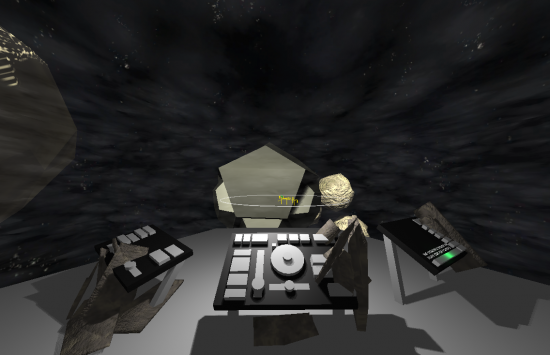
High visibility. The player can actually see “out” of the bridge at almost any direction.
To make the field of view much higher, I decided to apply an idea I had been holding onto for a while. By playing with the depth buffer a bit, I made some surfaces that hide the parts of the ship behind it. This dramatically improves visibility, and is also cool since it creates the effect of having an “impossible geometry.” (My explanation is that the ship is covered with tiny cameras that capture the state of the ship’s exterior, then display on interior screen-panels what the system extrapolates you would see from that point.)

It’s bigger on the inside.
With some more advanced ship designs, I think that could get really cool, really quick. (Battle bridge, anyone?)
One thing that made this effect much weaker is the cloudy effect I had to use to represent the volume of the ship. They look somewhat like stars, and it is a little weird that they form a box around the ship. This is meant to represent the volume of your craft, since you don’t have any other reference with the fancy windows active. Need to find a few artists for the next time I do something like this, so it doesn’t confuse.
Overall, I’m happy with how it turned out, although as a game the project was sorely lacking. For the next LD I’ll avoid ideas that need fancy but non-value-adding programming. I hope. It’s hard to resist a challenge.


I can recommend using something like FlashPunk or Flixel. You have to use ActionScript, but ActionScript is very similar to javascript.