VychVyzhProm by BOOtak

Welcome, comrade!
In programming, to start from "nothing", you should program with punchcards or assembler at least.
In this game, you will be playing as a soviet engineer working in a ВЫЧВЫЖПРОМ (VychVyzhProm) laboratory with a task to draw simple patterns with a programmable burner device. So you have to write a code in assembler to make it move.
==============
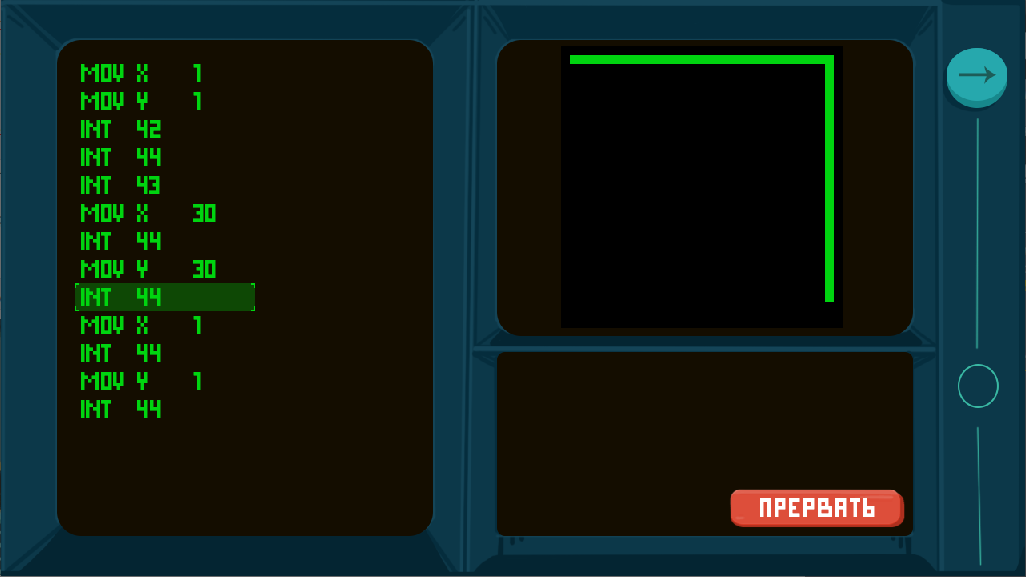
Available registers:
X, Y (used as X and Y coordinates to move plotter)
A, B (general-purpose registers)
Quick instructions set:
MOV A, B - move contents of B to A. B can be a register or positive or negative number
ADD A, B - move A + B to A. B can be a register or positive or negative number
MUL A, B - move A * B to A. B can be a register or positive or negative number
JMP C - jump (C - 1) lines up or down. C can be register or positive or negative number
CMP A, B - compare A with B. A and B can be registers and numbers
JG/JE/JL C - jump if A was greater than B, equal, or less.
INT N - interrupt
Supported interrupts:
42 - raise the burner (moving burner won't draw)
43 - lower the burner (now it leaves trace when moving)
44 - move the burner. It will be moved to coordinates stored in registers X and Y.
Use INT 44 interrupt with burner lowered to draw
Ratings
| Overall | 231th | 3.796⭐ | 56🧑⚖️ |
| Fun | 349th | 3.537⭐ | 56🧑⚖️ |
| Innovation | 176th | 3.75⭐ | 56🧑⚖️ |
| Theme | 497th | 3.389⭐ | 56🧑⚖️ |
| Graphics | 251th | 4.019⭐ | 56🧑⚖️ |
| Humor | 349th | 3.15⭐ | 52🧑⚖️ |
| Mood | 305th | 3.663⭐ | 54🧑⚖️ |
| Given | 40🗳️ | 64🗨️ |
The interface felt a bit clunky. I would have like regular text input like in [TIS-100](http://www.zachtronics.com/tis-100/) or [SHENZHEN I/O](http://www.zachtronics.com/shenzhen-io/).
Love the mood. I like the idea in abstract sense, but can't say I like to play it. I considered assembler too much of annoying work 35 years ago and I still feel same about it :D
Example: I wanted to change *43* to *42*, so I navigated to the respective field, hit bacscape and typed *2*. What I expected: *43 -> 4 -> 42*. What happened: *43 -> _ -> 2*.
Same point goes for removing lines. I expected that hitting bacscape on an empty line would delete it, rather than (re)clearing the selected field.
I assume, that you store the program or al least the lines as arrays, that contain control symbols. It has the advantage of making syntax errors impossible. However, I think that typing plain text reflects the programmer-experiance a bit better. Well, in the end it wil boil down to a question of taste and habituation.
"I assume, that you store the program or al least the lines as arrays" - YES, this is exactly how it is! Well, assembler probably has one of the simplest syntaxes to parse, so writing a proper translator would be no problem. I'll consider doing that in a post-LD version.
Simple minimalistic design and idea, 10/10
Struggled a bit at first with jump conditions (JG/JE/JL), expected them to always compare A and B registers upon reading the 'doc' and only understood after a bit of trial & error that they were to be used after CMP.
Also had a few small issues with the text editor. I feel like Backspace should delete previous block and Delete the current one rather rather than delete being line and backspace block value. Didn't feel like it not being a true text editor being that much of a problem, as having hotkeys for most instructions ended up being some sort of auto-complete which isn't bad and felt intuitive (though JE/JG/JL/JMP/MUL are missing), but i would expect for numbers to automatically clear the block content upon entering data. Two other quality of life features would be clicking on a block to select it (can already use the mouse to input so why not for moving around your code ?) and being able to hold arrow keys to move around faster without having to press keys dozens of times (same goes with Delete to delete multiple lines at once). Also didn't understand at first the Lower/Raise buttons, would expect an Up Arrow to Raise and Down Arrow to Lower.
Great to hear that you realize the potential in this, I wish you the best!
I do presume you've played all of Zachtronic's games? Otherwise you're in for a treat.
Same as above, I understood the conditional jumps to always compare A and B registers. But at least when I looked online what CMP actually did, I understood and it worked as expected in the game. Nice!
Some control over the execution speed would be nice, as sometimes you try to see if the execution actually passes through the lines you expect, and sometimes you're just waiting for the drawing.
Congrats!