Battle For 35 Leukothea by Rectifier

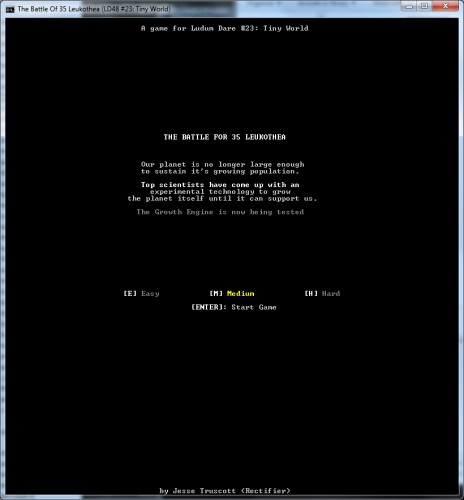
Should work in Windows, Mac OS X, and Linux!
Mac and Linux users should install Pygame first.
I made an ASCII tower defense game, set upon a small asteroid.
An asteroid that, thanks to you, is becoming not so small.
It went well! I used Python and the Pytality console library that I made after Pyweek, which until now had not been put to the test of an LD48. And it worked really well.
The game came together much more rapidly than I'd expected, and seems pretty stable. The towers ought to be reasonably balanced between each other.
30 waves, three difficulties.
If you beat Hard difficulty, leave a comment! I'd like to know just how evil it is.
The game will try to run in either Pygame or native Windows console. If one of them fails, try the other - you can pass "pygame" or "winconsole" to it as a command-line argument to switch.
NOTE: If the windows .exe crashes immediately on load, please try the Python source link!
Controls:
Arrow Keys: Scroll the map.
All other hotkeys are highlighted as [KEY] in-game.
Mac and Linux users should install Pygame first.
I made an ASCII tower defense game, set upon a small asteroid.
An asteroid that, thanks to you, is becoming not so small.
It went well! I used Python and the Pytality console library that I made after Pyweek, which until now had not been put to the test of an LD48. And it worked really well.
The game came together much more rapidly than I'd expected, and seems pretty stable. The towers ought to be reasonably balanced between each other.
30 waves, three difficulties.
If you beat Hard difficulty, leave a comment! I'd like to know just how evil it is.
The game will try to run in either Pygame or native Windows console. If one of them fails, try the other - you can pass "pygame" or "winconsole" to it as a command-line argument to switch.
NOTE: If the windows .exe crashes immediately on load, please try the Python source link!
Controls:
Arrow Keys: Scroll the map.
All other hotkeys are highlighted as [KEY] in-game.
Ratings
| Coolness | 55% | 3 |
| Overall | 3.14 | 335 |
| Fun | 3.03 | 315 |
| Graphics | 2.96 | 387 |
| Humor | 1.58 | 729 |
| Innovation | 3.52 | 160 |
| Mood | 2.75 | 377 |
| Theme | 3.34 | 259 |
My Pyweek game was my second foray into the land of the text console. I used the lessons from that to make this library, with the goal of it being as unobtrusive as possible during a compo. I think it succeeded - I only had to make a few small patches to it during the competition..
A little more polish and it'll be something I can actually recommend to others to use, I think!
At one point I held down the arrow keys and ended up having to wait for a bit for the thing to finish handling all the arrow key events. I don't know what freedom PyGame gives you, but something like turning off key repeat or flushing events after refreshing the screen would suffice.
If it weren't a Ludum Dare game I'd say the enemies should be more varied -- 30 waves of the same dudes (as far as I could tell) gets repetitive. I ended up using basic towers the whole time. (I played on easy -- don't know if that makes a difference).
Love the ASCII.
I'm not sure it works as a straight TD - maybe there's another way to make expandy-shrinky-world a good puzzle or source of strategy.
There are three different kinds of wave, with different accent-symbols and colors, but once on the ground they're basically the same unit. They appear every three levels, and the difference between them is magnified on higher difficulties.
Swarm waves spawn a lot more enemies spread out over the map, but with lower HP.
Cluster waves spawn more enemies grouped tightly together, with higher HP.
The Pygame version probably has some performance issues, yeah. Emulating a console is hard! I initially supported the native *nix console with this library, but a multitude of problems eventually scrapped that for pygame-or-windows only.
triplefox:
My original plan was to have the poles gradually shift as the world grew, making tower placement trickier. But I scrapped that as it made the balance crazy and wasn't trivial to implement.
2012-04-24 23:29:04.623 Python[48133:9537] *** __NSAutoreleaseNoPool(): Object 0x102164740 of class NSWindowGraphicsContext autoreleased with no pool in place - just leaking
Huh! I've never seen that before, although admittedly I haven't tried OS X. It's pretty standard usage of Pygame. Do you get that error with other pygame entries?
Exception: Your window is x=228, y=68. Minimum required size is x=101, y=71
My nit-picks: The two separate bases to defend makes me feel constantly off balance - I improve one, then another, etc. Also, I'd like some maps more conducive to making mazes, as that was always my favorite part of TDs.
But those are nits. This is too cool.
You're on Linux and trying to use the native terminal, which can't resize your window for you. And your window isn't tall enough.
Either make your window tall enough, as it says, but watch out for terminal graphics problems (there's a /lot/ of them in most of the popular terminal emulators, I tested this during pyweek) - Or, as I would recommend, install pygame and use that version. It'll be correct to the pixel.
johnfn:
Thanks! I generally prefer mazing TDs too, but then I'd have to make sure my pathfinding can handle whatever crafty players throw at it, and that sounded far too hard for an LD48.
The ascii look and keyboard control works surprisingly well. The path of the enemies felt quiet random so it took three waves until my towers got something to shoot at.
How did you put all the stuff into one exe file?
You can see my py2exe configuration at https://gist.github.com/2521749 , but note that it only works well if you don't need any non-python libraries. I haven't figured out how to get an exe like that to work when Pygame is involved.
It'll run on Mac if you have Python and Pygame!
Didn't even notice the scrollbar until now. Kudos that you stuck that in, though. Many entries don't seem to have something to help resolve those issues.
Traceback (most recent call last):
File "/Users/MYNAME/Downloads/ld23/run_game.py", line 4, in <module>
main.main()
File "/Users/MYNAME/Downloads/ld23/gamelib/main.py", line 16, in main
pytality.term.init(width=screen_width, height=screen_height)
File "/Users/MYNAME/Downloads/ld23/pytality/term.py", line 117, in init
resize(config['width'], config['height'])
File "/Users/MYNAME/Downloads/ld23/pytality/term.py", line 145, in resize
impl.resize(width, height)
File "/Users/MYNAME/Downloads/ld23/pytality/term_curses.py", line 84, in resize
raise Exception("Your window is x=%s, y=%s. Minimum required size is x=%s, y=%s" % (x, y, width, height))
Exception: Your window is x=80, y=24. Minimum required size is x=101, y=71
Turns out I have a program called "Build Applet" which looks like it turns python program into Mac applications, so if you manage to figure out what was going on or anything maybe I could try and turn it into an application for you? I really don't know anything about python, so it might not work, or maybe it's really easy to turn something into an application, but whatever.
Says right there in the text. On Linux/Mac, using the normal ansi console, the program is unable to resize your terminal for you. And yours is 80x24 and it needs 101x71.
That said, I highly recommend installing Pygame and letting it use that instead. You won't have this issue, and while I haven't been able to test the OS X terminal emulator, the Linux ones have a lot of rendering bugs when pushed this far.
masterhyjinx:
The terrain types have a minor movement cost, but don't have much effect. The biggest reason for it was because a blank screen was totally confusing with the wraparound world.
too...narrow? Looking at my screenshot, it's 800px wide. What resolution are you using? 800x600?
At 900px tall, it's admittedly a little less friendly there, but at least the things on the bottom aren't terribly important.
My only complaint is that it buffers key events and tries processing them even after I let up on the key. The screen moving with my hand off the keyboard was odd.
Technically: had some resolution problems on my 1366x768 laptop monitor (game didn't fit heightwise). Luckily I was able to play because it scrolled and I didn't need the bottom part too much.