ShiftMatch by smoreley


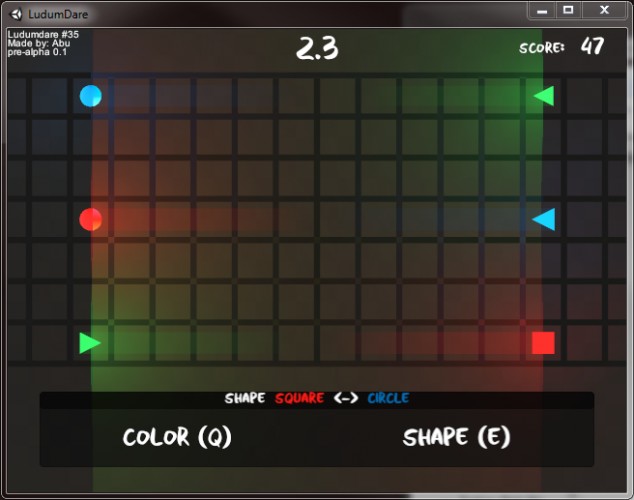
Involves matching things!
Controls:
(Q) -> select color -> followed by (1,2,3) for first color -> followed by (1,2,3) for second color
(E) -> select shape -> followed by (1,2,3) for first shape -> followed by (1,2,3) for second shape
---------------------------------------------------------------
(Updates go newest to oldest)
Update: There is now a web version that rips out the pretty effects in the game which is sad but atleast the core component of it works. Also did a linux versions which is untested because I don't have any means of giving it a go, if the linux versions is completetly broken let me know because there is no other way ill find out.
Update: We now have stat tracking! Now you can keep track of how many you have cleared and what your highest score has been. Also, been working on simplifying certain parts of the game, for example, Originally when you wanted to select a shape the information was displayed via text, now its done by iconography which is a major improvement when having to select a shape. Removed some stuff on the game page that was made things confusing. Added sounds, or rather a sound, which is better then nothing.Oh I almost forgot (no i didn't) but we now have SCREEN SHAKE!
Update: Its a game! Albeit missing some stat tracking, like your high score and how many columns you have cleared. Might add these in later. Oh, and it has no sound... definitely need to add that in, but at-least the core of it is there.
Update: Almost a game! Just got to work out an algorithm that will generate waves. We now have a pause screen, and a game over screen. Basic score system is in place. All colors and shape transformations are working. Couple of other effects were added that mechanically don't do any thing but make the game more interesting.
Update: Main Menu was added where you can start the game and also a little help section. Color and shape shifting work for the most part (Haven't set up Yellow yet). Movement Timer. Made GUI more resolution friendly so that it maintains usability when using other resolutions (still recommend using the default one). Pressing (esc) will now pause the game and hitting (-) on the keypad will reset the level (will change this to be more user friendly later, for now I have other things that I need to focus on).
Update: Main Menu was added where you can start the game and also a little help section. Color and shape shifting work for the most part (Haven't set up Yellow yet). Movement Timer. Made GUI more resolution friendly so that it maintains usability when using other resolutions (still recommend using the default one). Pressing (esc) will now pause the game and hitting (-) on the keypad will reset the level (will change this to be more user friendly later, for now I have other things that I need to focus on).
Got a late start due to having prior commitments. Still want to submit some thing (even if it's barely or not at all functional).
Going to keep working on it, see how far I can get with the time left. Will be updating as progress is made.
---------------------------------------------------------------
CHALLENGE! Do you accept (y/n)?
Game is hard and will test your metal, so here's a challenge. Do you think you can beat my high score? Currently my best is 18 (update, now its 27! Update, the game has been made easier and there are two modes so i really do not know where my best score stands right now) and gosh darn its hard getting that! Will update as my mad skills improve.
---------------------------------------------------------------
HELP! Need help, this section is for you.
Update: Refer to ingame tutorial (cause we now have one).
First check the INFO section in the game (Its on the main menu, also click on the I button for an example of inpu).
Still confused? Let me break it down for you.
You can only change the shapes on the left. You can change both their color and shape.
Shapes on the left must match shapes on the right (both in form and color) before they reach the center (otherwise game over).
Every so many seconds the shapes will move closer to the center (hit space-bar to speed this process up, BUT only do this is both sides are matching)
Update: There has been alot of confusion on how to play the game, im sorry. I've been taken peoples feed back and examining the problem closely as how to make things clearer. Various steps have been taken to try and clear things up but the be all end all is probably a tutorial level. I'm working on that (Update: and now we have one)
Controls:
(Q) -> select color -> followed by (1,2,3) for first color -> followed by (1,2,3) for second color
(E) -> select shape -> followed by (1,2,3) for first shape -> followed by (1,2,3) for second shape
---------------------------------------------------------------
(Updates go newest to oldest)
Update: There is now a web version that rips out the pretty effects in the game which is sad but atleast the core component of it works. Also did a linux versions which is untested because I don't have any means of giving it a go, if the linux versions is completetly broken let me know because there is no other way ill find out.
Update: We now have stat tracking! Now you can keep track of how many you have cleared and what your highest score has been. Also, been working on simplifying certain parts of the game, for example, Originally when you wanted to select a shape the information was displayed via text, now its done by iconography which is a major improvement when having to select a shape. Removed some stuff on the game page that was made things confusing. Added sounds, or rather a sound, which is better then nothing.Oh I almost forgot (no i didn't) but we now have SCREEN SHAKE!
Update: Its a game! Albeit missing some stat tracking, like your high score and how many columns you have cleared. Might add these in later. Oh, and it has no sound... definitely need to add that in, but at-least the core of it is there.
Update: Almost a game! Just got to work out an algorithm that will generate waves. We now have a pause screen, and a game over screen. Basic score system is in place. All colors and shape transformations are working. Couple of other effects were added that mechanically don't do any thing but make the game more interesting.
Update: Main Menu was added where you can start the game and also a little help section. Color and shape shifting work for the most part (Haven't set up Yellow yet). Movement Timer. Made GUI more resolution friendly so that it maintains usability when using other resolutions (still recommend using the default one). Pressing (esc) will now pause the game and hitting (-) on the keypad will reset the level (will change this to be more user friendly later, for now I have other things that I need to focus on).
Update: Main Menu was added where you can start the game and also a little help section. Color and shape shifting work for the most part (Haven't set up Yellow yet). Movement Timer. Made GUI more resolution friendly so that it maintains usability when using other resolutions (still recommend using the default one). Pressing (esc) will now pause the game and hitting (-) on the keypad will reset the level (will change this to be more user friendly later, for now I have other things that I need to focus on).
Got a late start due to having prior commitments. Still want to submit some thing (even if it's barely or not at all functional).
Going to keep working on it, see how far I can get with the time left. Will be updating as progress is made.
---------------------------------------------------------------
CHALLENGE! Do you accept (y/n)?
Game is hard and will test your metal, so here's a challenge. Do you think you can beat my high score? Currently my best is 18 (update, now its 27! Update, the game has been made easier and there are two modes so i really do not know where my best score stands right now) and gosh darn its hard getting that! Will update as my mad skills improve.
---------------------------------------------------------------
HELP! Need help, this section is for you.
Update: Refer to ingame tutorial (cause we now have one).
First check the INFO section in the game (Its on the main menu, also click on the I button for an example of inpu).
Still confused? Let me break it down for you.
You can only change the shapes on the left. You can change both their color and shape.
Shapes on the left must match shapes on the right (both in form and color) before they reach the center (otherwise game over).
Every so many seconds the shapes will move closer to the center (hit space-bar to speed this process up, BUT only do this is both sides are matching)
Update: There has been alot of confusion on how to play the game, im sorry. I've been taken peoples feed back and examining the problem closely as how to make things clearer. Various steps have been taken to try and clear things up but the be all end all is probably a tutorial level. I'm working on that (Update: and now we have one)
Ratings
| Coolness | 89% | 2 |
| Overall(Jam) | 3.11 | 665 |
| Fun(Jam) | 2.82 | 777 |
| Graphics(Jam) | 2.98 | 754 |
| Innovation(Jam) | 3.11 | 501 |
| Mood(Jam) | 2.82 | 755 |
| Theme(Jam) | 3.39 | 508 |
Well done on getting it in though!
I like the concept. Some sound whould have been nice :)
You can think on a way to explicit show what is the field of the player, maybe a different color or something like that. Also, I couldn't get out from the tutorial screen, so I had to restart the game, tee hee.
See ya ;)
The controls are a bit hard to get. If it had better/simpler gameplay this entry would have been really awesome!