ColorBridge by TheSambassador
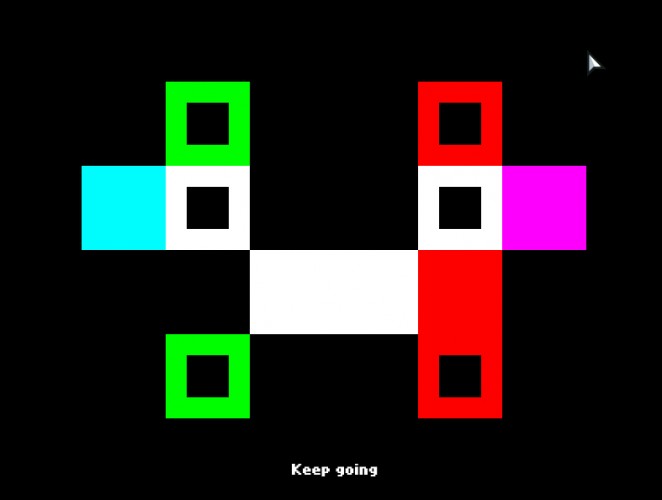
Just a note for future raters - you aren't supposed to be able to select a single color! Once a square is a single color, you cannot move it any more. Also, solutions do not require a direct line across.
Got rushed in the end due to not being able to work on this on most of Saturday. Less levels than I would have liked! Also much less intuitive than I would have liked.
There is a tutorial, but here is a basic explanation of the mechanics if that doesn't explain things for you.
Click a square to select it
Click a specific color in the color picker to select that color
Click an adjacent square, or an adjacent empty space, to move the selected color into that space.
All colors are composed of Red, Green, and Blue. White is the combination of all colors. Squares can be either a single color or a mix (teal = green + blue)
You cannot move or interact with a single-color square, but you can move a color from an adjacent square into a single-color square.
Your goal is to "bridge" the black-centered squares with their color(s). 2 red goals need specifically red squares between them to "bridge". 2 white goals can use ANY colors to bridge. A yellow goal can use either Red or Green colors to bridge. A BRIDGE DOES NOT NEED TO BE DIRECT LINES ACROSS.
Occasionally it may seem "locked up" in that you can't click on anything for a second. If this happens, just click on a black area away from the existing squares and then continue like normal.
Hit R to restart, just in case you miss it. There's a basic tutorial.
Note that white can be bridge by any colors,
2-color combination goals like Teal can be bridged by any color that they have (purple = red + blue, so red or blue can be used to bridge it)
Got rushed in the end due to not being able to work on this on most of Saturday. Less levels than I would have liked! Also much less intuitive than I would have liked.
There is a tutorial, but here is a basic explanation of the mechanics if that doesn't explain things for you.
Click a square to select it
Click a specific color in the color picker to select that color
Click an adjacent square, or an adjacent empty space, to move the selected color into that space.
All colors are composed of Red, Green, and Blue. White is the combination of all colors. Squares can be either a single color or a mix (teal = green + blue)
You cannot move or interact with a single-color square, but you can move a color from an adjacent square into a single-color square.
Your goal is to "bridge" the black-centered squares with their color(s). 2 red goals need specifically red squares between them to "bridge". 2 white goals can use ANY colors to bridge. A yellow goal can use either Red or Green colors to bridge. A BRIDGE DOES NOT NEED TO BE DIRECT LINES ACROSS.
Occasionally it may seem "locked up" in that you can't click on anything for a second. If this happens, just click on a black area away from the existing squares and then continue like normal.
Hit R to restart, just in case you miss it. There's a basic tutorial.
Note that white can be bridge by any colors,
2-color combination goals like Teal can be bridged by any color that they have (purple = red + blue, so red or blue can be used to bridge it)
Ratings
| Coolness | 45% | 1411 |
| Overall | 2.93 | 812 |
| Fun | 2.59 | 922 |
| Graphics | 2.22 | 1145 |
| Innovation | 3.74 | 134 |
| Mood | 2.39 | 1011 |
| Theme | 3.52 | 571 |
That said, you definitely seem to be able to click where the green color picker is on a green square and then move it. That is a bug, and makes the game really easy.
Think I ran into a bug... Sometimes, elements that weren't "bridged" would disappear, and other times, elements with a single basic color would get stuck... Hard to select a color when the object is of a single color as well...
But very cool design...