Trigger Warning by Dark Arts and Sciences


*** This isn't finished, but it's headed somewhere interesting. I'm posting what I have now and hoping social pressure will make me finish it instead of sending it to the Island of Forgotten Prototypes. ***
Flash "protoype": Requires only a web browser with Flash.
Python rewrite: Requires python and pygame. Download the file from the pastebin as "trigger_warning.py" and run it from the command line via "python trigger_warning.py"
Source: Contains both Flash and Python versions, all source files and resources, and git logs from start to finish (the folder might be invisible, but they're there). Bonus: countdown.py script for displaying competition time left, works with GeekTool.
Controls - Flash: Hold down the mouse to attract boids, release it to scare them away.
Controls - Python: Hold down the mouse to attract boids. Attract the boids to the triggers; they'll turn yellow if you succeed. Press R to rewind time by 1/4 second.
Boids set off triggers that they touch.
Boids are yellow if they have touched a trigger, blue if they're angry about other boids flying too close, and red if they're very angry.
Luckily for you, I ran out of time and did not implement any painful triggers. (You're welcome.)
For future pain-enhanced versions, visit:
darkartsandsciences.com
Longer notes:
No, it isn't complete. Here's what IS finished:
The flying dots are Boids [http://en.wikipedia.org/wiki/Boids]. Boids are an artificial life form that use simple rules to produce complex behavior simulating a flock of birds. Each boid INDIVIDUALLY looks at rest of the flock and chooses where to fly next.
I did not invent Boids; the original algorithm was developed in 1986. I started with this pseudocode [http://www.kfish.org/boids/pseudocode.html], converted it into Flash, realized that a: With more than five boids, Flash doesn't have enough power to calculate that many nested for loops in one frame on a MacBook Air and b: I quit using ActionScript and learned Python for many Very Good Reasons. And re-converted it into Python.
I don't regret starting over, but I do regret not giving up on the Flash version sooner. The two versions may have similar features, but the Flash code is at touch-anything-and-everything-breaks while the Python version is still fun to work on. If I'd moved on sooner, I'd have something much more playable.
Anyway, my core idea is to stick a few more rules on top of the emergent behavior already in Boids and see what happens. Boids. Ten seconds. Trigger. Warning.
Thus, the rest of the rules:
Triggers have warnings (the red text) and an effect (any function) that happens ten seconds later. Like the intro says, you can't edit THAT ten seconds, but you CAN edit time itself.
Time is pausable and rewindable. Watch the intro closely. That isn't your computer lagging; game time actually STOPS (on "itself" and "can", if it's synced right).
Editing time affects when warnings and effects happen. Boids are not affected directly, but will immediately react to any changes in the game world.
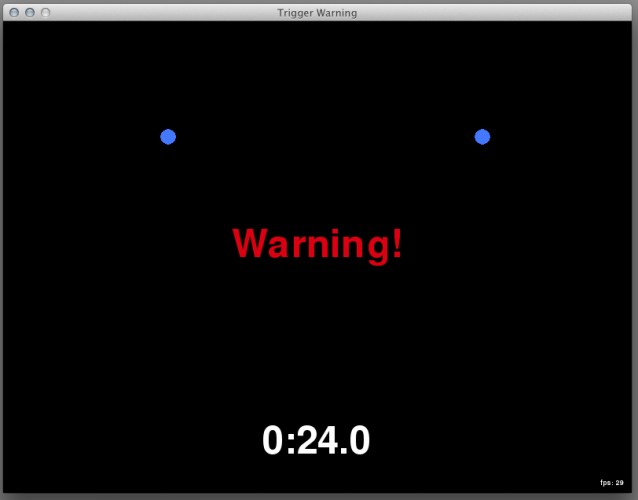
The trigger system actually creates everything except the intro text and the first two trigger dots. The red "Warning!" message is the first warning. It takes ten seconds to fade out, then triggers the "start game" effect, which turns on the trigger dots and creates the boids. Those triggers then turn boids that touch them yellow.
Boids have moods which affect their behavior. ("Angry Boids" would not be an inaccurate alternate title.)
In the Python version, the only mood is anger, which goes up when a boid has to fly around another boid and goes down over time. If you make the boids fly into each other (by holding the mouse down and waiting for them to fly to it), they will turn blue and eventually red. It's hard to see, but angrier boids have a higher maximum speed.
In the Flash version, boids have separate anger/red, fear/blue and tired/green variables, which combine smoothly to set the boid's color. Angry boids won't try to avoid collisions with other boids. Boids that are startled by noise/mouse clicks, fly too fast, or almost hit other boids become fearful. Tired boids will drop to the bottom of the screen and rest for ten seconds, which regenerates all their moods.
Flash only: When you release the mouse button, boids are startled away from that point for ten seconds. They remember the startle point instead of avoiding the mouse's current location.
Here's what ISN'T finished:
The initial two triggers should rewind time by a second whenever a boid touches them. (I almost got this in right before the deadline, but Python didn't like where I was accessing the time offset variable from. If I had more of a game by that point, I'd have called it a game-breaking bug and spent a few more minutes passing references around. Rewinding works, triggering it doesn't.)
Once you've messed with time enough, the real levels should start. If you don't figure out what you're supposed to be doing within ten seconds, a help message appears explaining the controls, something like "Click and hold and the mouse on a green thing until a white dot hits it and turns yellow. Look what the timer did. Now do that nine more times because a: theme and b: I want to be SURE you understand the controls."
Real levels. I don't have ANYTHING implemented here, but here's the design document I wrote during the competition. [http://www.darkartsandsciences/trigger-warning-design] Short version: you don't control the boids directly, but you can create and/or fire triggers that affect their behavior.
Flash "protoype": Requires only a web browser with Flash.
Python rewrite: Requires python and pygame. Download the file from the pastebin as "trigger_warning.py" and run it from the command line via "python trigger_warning.py"
Source: Contains both Flash and Python versions, all source files and resources, and git logs from start to finish (the folder might be invisible, but they're there). Bonus: countdown.py script for displaying competition time left, works with GeekTool.
Controls - Flash: Hold down the mouse to attract boids, release it to scare them away.
Controls - Python: Hold down the mouse to attract boids. Attract the boids to the triggers; they'll turn yellow if you succeed. Press R to rewind time by 1/4 second.
Boids set off triggers that they touch.
Boids are yellow if they have touched a trigger, blue if they're angry about other boids flying too close, and red if they're very angry.
Luckily for you, I ran out of time and did not implement any painful triggers. (You're welcome.)
For future pain-enhanced versions, visit:
darkartsandsciences.com
Longer notes:
No, it isn't complete. Here's what IS finished:
The flying dots are Boids [http://en.wikipedia.org/wiki/Boids]. Boids are an artificial life form that use simple rules to produce complex behavior simulating a flock of birds. Each boid INDIVIDUALLY looks at rest of the flock and chooses where to fly next.
I did not invent Boids; the original algorithm was developed in 1986. I started with this pseudocode [http://www.kfish.org/boids/pseudocode.html], converted it into Flash, realized that a: With more than five boids, Flash doesn't have enough power to calculate that many nested for loops in one frame on a MacBook Air and b: I quit using ActionScript and learned Python for many Very Good Reasons. And re-converted it into Python.
I don't regret starting over, but I do regret not giving up on the Flash version sooner. The two versions may have similar features, but the Flash code is at touch-anything-and-everything-breaks while the Python version is still fun to work on. If I'd moved on sooner, I'd have something much more playable.
Anyway, my core idea is to stick a few more rules on top of the emergent behavior already in Boids and see what happens. Boids. Ten seconds. Trigger. Warning.
Thus, the rest of the rules:
Triggers have warnings (the red text) and an effect (any function) that happens ten seconds later. Like the intro says, you can't edit THAT ten seconds, but you CAN edit time itself.
Time is pausable and rewindable. Watch the intro closely. That isn't your computer lagging; game time actually STOPS (on "itself" and "can", if it's synced right).
Editing time affects when warnings and effects happen. Boids are not affected directly, but will immediately react to any changes in the game world.
The trigger system actually creates everything except the intro text and the first two trigger dots. The red "Warning!" message is the first warning. It takes ten seconds to fade out, then triggers the "start game" effect, which turns on the trigger dots and creates the boids. Those triggers then turn boids that touch them yellow.
Boids have moods which affect their behavior. ("Angry Boids" would not be an inaccurate alternate title.)
In the Python version, the only mood is anger, which goes up when a boid has to fly around another boid and goes down over time. If you make the boids fly into each other (by holding the mouse down and waiting for them to fly to it), they will turn blue and eventually red. It's hard to see, but angrier boids have a higher maximum speed.
In the Flash version, boids have separate anger/red, fear/blue and tired/green variables, which combine smoothly to set the boid's color. Angry boids won't try to avoid collisions with other boids. Boids that are startled by noise/mouse clicks, fly too fast, or almost hit other boids become fearful. Tired boids will drop to the bottom of the screen and rest for ten seconds, which regenerates all their moods.
Flash only: When you release the mouse button, boids are startled away from that point for ten seconds. They remember the startle point instead of avoiding the mouse's current location.
Here's what ISN'T finished:
The initial two triggers should rewind time by a second whenever a boid touches them. (I almost got this in right before the deadline, but Python didn't like where I was accessing the time offset variable from. If I had more of a game by that point, I'd have called it a game-breaking bug and spent a few more minutes passing references around. Rewinding works, triggering it doesn't.)
Once you've messed with time enough, the real levels should start. If you don't figure out what you're supposed to be doing within ten seconds, a help message appears explaining the controls, something like "Click and hold and the mouse on a green thing until a white dot hits it and turns yellow. Look what the timer did. Now do that nine more times because a: theme and b: I want to be SURE you understand the controls."
Real levels. I don't have ANYTHING implemented here, but here's the design document I wrote during the competition. [http://www.darkartsandsciences/trigger-warning-design] Short version: you don't control the boids directly, but you can create and/or fire triggers that affect their behavior.
| Post-Compo | http://github.com/DarkArtsAndSciences/trigger-warning |
| Flash (older) | http://www.darkartsandsciences.com/trigger_warning |
| Python (newer) | http://pastebin.com/U1tVuwvv |
| Source (both versions + resources + git logs, 9.3MB) | http://www.darkartsandsciences.com/trigger-warning-source.zip |
| Original URL | https://ludumdare.com/compo/ludum-dare-27/?action=preview&uid=13938 |
Ratings
| Coolness | 55% | 3 |
| Overall(Jam) | 2.10 | 601 |
| Audio(Jam) | 1.71 | 483 |
| Fun(Jam) | 1.41 | 610 |
| Graphics(Jam) | 1.97 | 582 |
| Humor(Jam) | 1.47 | 487 |
| Innovation(Jam) | 2.79 | 361 |
| Mood(Jam) | 2.00 | 533 |
| Theme(Jam) | 2.21 | 563 |
The boid flocking was pretty nicely done too.
Also, you might want to put a link to pygame in the description, so that some more people could download it.
Despite being incomplete, the primary interaction felt nice, and the potential for "herding" games with it seemed interesting.