Screen Mover by Sh1rogane
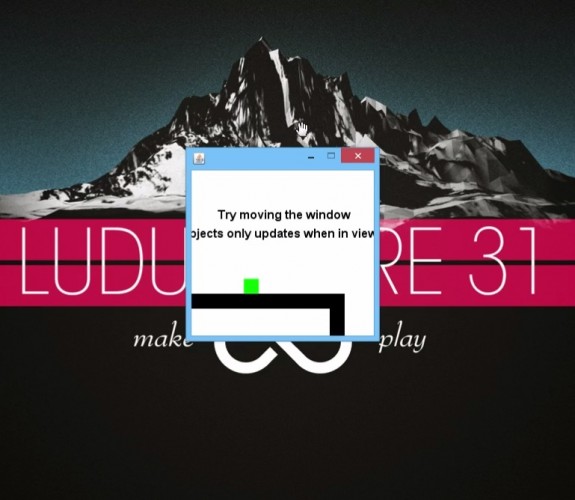

Screen Mover is a very simple platform game with a difference screen mechanic. You move the screen by dragging the window to reveal more of the level but only the objects that are inside the view (inside the window) are alive (or updates). The goal is to navigate your way to the goal (the blue block with the text "Goal" over it) and avoid being killed.
It is recommended to play this game on a screen with at least 1366x768 (or often the standard laptop resolution) absolute minimum size to play this game is 1280x720
I have no idea how this game will play on difference OS other that Window.
*UPDATE*
Apparently this game does not work on Mac so if anyone with a Mac can run the jar with the terminal with the command java -jar LD31.jar that will print the error or exception in the terminal and then make a comment here with that text. Thanks!
CONTROLS
Move right and left - Left and right arrow keys or A and D
Jump - Space or W or Up arrow key
Move the screen - Drag the screen as usual
IN POST COMPO VERSION
ESC - Quit game
You can't move the window and the player at the same time in the compo version (you can now in the post compo version)
Getting stuck?
Remember that objects only live/updates when inside the view/window.
Or look at this to get a clue http://a.pomf.se/hpgmeu.mp4?_=1
*POST COMPO UPDATE*
Okay I have added a new better version of the game.
With this update I have removed the window around it and made so you can drag the window just by holding down the mouse button anywhere on the window and drag. So now you can both drag the window and move at the same time.
(And I changed how it looks when you win)
It is recommended to play this game on a screen with at least 1366x768 (or often the standard laptop resolution) absolute minimum size to play this game is 1280x720
I have no idea how this game will play on difference OS other that Window.
*UPDATE*
Apparently this game does not work on Mac so if anyone with a Mac can run the jar with the terminal with the command java -jar LD31.jar that will print the error or exception in the terminal and then make a comment here with that text. Thanks!
CONTROLS
Move right and left - Left and right arrow keys or A and D
Jump - Space or W or Up arrow key
Move the screen - Drag the screen as usual
IN POST COMPO VERSION
ESC - Quit game
You can't move the window and the player at the same time in the compo version (you can now in the post compo version)
Getting stuck?
Remember that objects only live/updates when inside the view/window.
Or look at this to get a clue http://a.pomf.se/hpgmeu.mp4?_=1
*POST COMPO UPDATE*
Okay I have added a new better version of the game.
With this update I have removed the window around it and made so you can drag the window just by holding down the mouse button anywhere on the window and drag. So now you can both drag the window and move at the same time.
(And I changed how it looks when you win)
| Java Jar (Window, Mac, Linux) | https://googledrive.com/host/0B_qeG47GkI9CWjdLY0tXRHdROGs/LD31/LD31.jar |
| Java Jar POST COMPO | https://googledrive.com/host/0B_qeG47GkI9CWjdLY0tXRHdROGs/LD31/LD31_POST_COMPO.jar |
| Walkthrough | https://www.youtube.com/watch?v=8bfI1BiOLhE |
| Source | https://bitbucket.org/Sh1rogane/ld31 |
| Original URL | https://ludumdare.com/compo/ludum-dare-31/?action=preview&uid=14496 |
Ratings
| Coolness | 100% | 1 |
| Overall | 3.83 | 67 |
| Audio | 2.20 | 809 |
| Fun | 3.64 | 137 |
| Graphics | 2.38 | 1003 |
| Humor | 2.47 | 568 |
| Innovation | 4.60 | 5 |
| Mood | 2.74 | 722 |
| Theme | 4.60 | 10 |
Well done, by the way. This was a very creative game.
It sort of seems opposite the theme to me, but that's my only, minor complaint. Great job!
Well Done!!!
Nice idea and flawless execution.
It would be nice not to need to repeat the first section to get back to the moving red barriers, but it's short enough that it didn't end up mattering. Cool!
Congrats, I really like to play it!
This must be the most innovative game that I've played so far. The mechanic would have been interesting enough if you were moving the screen around while controlling the player, but also making things only update if they're on the screen was incredibly cool. I almost wish it didn't just tell me that at the beginning. The idea of stopping the bullets at the beginning by not showing them on the screen blew my mind! Then setting up the pattern so that you can fall down and not get hit by the red blocks was a new challenge I'd never seen before. It was also fun that it masked my desktop! Awesome job!!
Good idea, though at the moment it's nigh impossible to beat.
-AlucardX60
I have to say this is the best use of the theme in this round of LD. I haven't seen one that I liked as much anywhere.
AWESOME !
Congratulations !
It'd be cool if it had better graphics and audio.
I only had a problem because I deactivated the option to see the content of the window when I move it, so I coudn't see the game when I was doing it haha.
Fantastic idea, very well done. Graphics would be cool, and I'm not sure how well it'd run on smaller monitors. (Unless it's scaled, then I'll shut up <3)
Nice job, did enjoy. :D