Melon Thrower by Thepattybeast
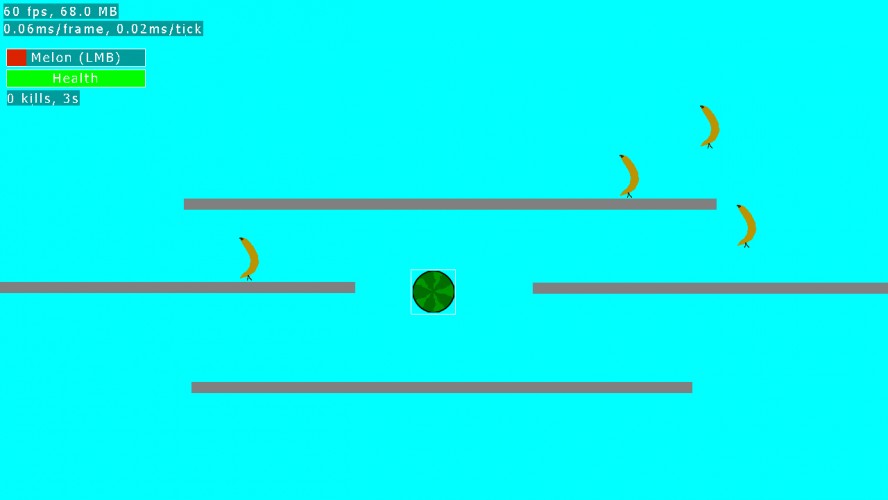

Singleplayer(SP) & Multiplayer(MP)
IMPORTANT: READ THE SETTING UP MP SECTION BEFORE DOING MP
If the game does not work try launch with java -jar LD32.jar in console(SHiFT + right click with no file selected in windows explorer)
Also: invalid major.minor version errors are caused by outdated java UPDATE YOUR JAVA
Controls:
Left Mouse Button - fire melon (or drop banana in mp)(place platorm or delete in editor)
Right Mouse Button - Set banana start location (MP)
Escape - Pause
Scroll - change platform size (Editor)
W - increase platform size fast (Editor)
S - decrease platform size fast (Editor)
E - toggle edit mode (Will break MP, left over debug feature)
NOTE: You will always be melon thrower in Singleplayer
How to play(Melon thrower):
Stop the bananas before they reach you. When the banana reaches the ground(bottom of the screen), it will run at you(grow bigger) when it reaches you it will turn red and start reducing your health. Shoot it with a melon before that happens. When you shoot a melon will appear, it will get smaller then disappear taking any bananas its colliding with it when it disappears with it.
How To Play(Banana Dropper): Get bananas to the bottom of the screen press or hold left mouse button to drop bananas. the bananas will be move toward the position of the mouse when fired.
The line will show the path the banana will follow. Right clicking will set the start x of the banana. If the banana hits a platform the banana wiil stop y movement and keep original x movement.
HOW TO DO MULTIPLAYER:
If you do multiplayer you will likely have to port forward.
Host a lobby:
select host a lobby and in the popup just click ok.
(the fist thing before the colon(:) is the ip to listen for, someone on the internet told me to put the ip of the person who is trying to connect in to skip port forwarding but i couldn't get that to work(local ip? i tried wan ip and it didn't work), (by default it will be your lan ip)). The second thing is port.
Connect to the lobby
Click Join lobby
by default it is (your ip:default port)
type in (ip of host:port host lobby is on)
select a level from the list and click start
IMPORTANT: READ THE SETTING UP MP SECTION BEFORE DOING MP
If the game does not work try launch with java -jar LD32.jar in console(SHiFT + right click with no file selected in windows explorer)
Also: invalid major.minor version errors are caused by outdated java UPDATE YOUR JAVA
Controls:
Left Mouse Button - fire melon (or drop banana in mp)(place platorm or delete in editor)
Right Mouse Button - Set banana start location (MP)
Escape - Pause
Scroll - change platform size (Editor)
W - increase platform size fast (Editor)
S - decrease platform size fast (Editor)
E - toggle edit mode (Will break MP, left over debug feature)
NOTE: You will always be melon thrower in Singleplayer
How to play(Melon thrower):
Stop the bananas before they reach you. When the banana reaches the ground(bottom of the screen), it will run at you(grow bigger) when it reaches you it will turn red and start reducing your health. Shoot it with a melon before that happens. When you shoot a melon will appear, it will get smaller then disappear taking any bananas its colliding with it when it disappears with it.
How To Play(Banana Dropper): Get bananas to the bottom of the screen press or hold left mouse button to drop bananas. the bananas will be move toward the position of the mouse when fired.
The line will show the path the banana will follow. Right clicking will set the start x of the banana. If the banana hits a platform the banana wiil stop y movement and keep original x movement.
HOW TO DO MULTIPLAYER:
If you do multiplayer you will likely have to port forward.
Host a lobby:
select host a lobby and in the popup just click ok.
(the fist thing before the colon(:) is the ip to listen for, someone on the internet told me to put the ip of the person who is trying to connect in to skip port forwarding but i couldn't get that to work(local ip? i tried wan ip and it didn't work), (by default it will be your lan ip)). The second thing is port.
Connect to the lobby
Click Join lobby
by default it is (your ip:default port)
type in (ip of host:port host lobby is on)
select a level from the list and click start
Ratings
| Coolness | 32% | 1952 |
| Overall | 2.67 | 958 |
| Fun | 2.61 | 883 |
| Graphics | 2.16 | 1016 |
| Humor | 2.47 | 684 |
| Innovation | 2.78 | 765 |
| Mood | 2.25 | 974 |
| Theme | 3.17 | 702 |
However I have found what caused it... The slash is '/' on Linux instead of '\' and therefore the resources cannot be loaded correctly. (Don't ask me how I did this... I just took a look at the console and found this...)
The most obvious problem is the melon reload time. The player wants to always be doing something, even if that 'something' is just clicking furiously. If you're going to add a reload time there needs to be a reason for it, and you need to give the player something else to do while they're waiting (e.g. a way of setting the enemies up for the next shot, or having a game complex enough that the player uses up the wait-time strategizing their next move).
I also think the game mechanic itself could be better implemented. Dropping melons on bananas sounds like it could be fun... but the way it was implemented was totally generic. It just felt like dropping <sprite_a> on <sprite_b>. A little animation and sound-effects can go a long way! Seeing and hearing splatters would have been great.
I do wish I had someone to try multiplayer with to see how it works. I know that multiplayer can be a tricky thing to set up, and it's always nice to see a ludumdare creator that went the extra mile to add it.